
Return Editor icon
Return Editor icon

Return Editor

Return is a macOS document workbench for lawyers. It reads your contracts and matters with an AI engine that runs on your own Mac. The name comes from the return key: the document stays quiet until you press Return and ask for analysis.
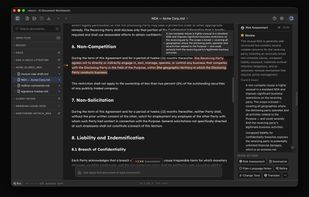
Every clause scored in place. Hover any flag to see why it matters and for whom.

Cost / License

  • Freemium (Subscription)
  • Proprietary

Platforms

  • Mac
0likes
0articles

Features

Properties

  1.  Privacy focused
  2.  Local-First
  3.  AI-Powered

Features

  1.  Dark Mode
  2.  Full-Text Search
  3.  Syntax Highlighting
  4.  Live Preview
  5.  Support for MarkDown
  6.  No registration required
  7.  No Tracking
  8.  Works Offline
  9.  Semantic Search
  10.  Local AI
  11.  AI Writing

Return Editor News & Activities

Highlights All activities

Recent activities

Return Editor information

Return Editor was added to AlternativeTo by Michal jantos on and this page was last updated .
No comments or reviews, maybe you want to be first?

What is Return Editor?

Return is a macOS document workbench for lawyers. It reads your contracts and matters with an AI engine that runs on your own Mac. The name comes from the return key: the document stays quiet until you press Return and ask for analysis.

Return ships with a local AI engine based on llama.cpp. No account is required, nothing is uploaded, and the app sends no telemetry. You can pick local models such as Granite 4.1 8B, Qwen 3.5, Bielik 11B for Polish, and GPT-OSS 20B and 120B, or browse Hugging Face GGUF models from inside the app. In Local mode, documents never leave your Mac. A Pro subscription adds Cloud mode for stronger cloud models, as an explicit opt-in per user. Semantic search always stays on your Mac, even in Cloud mode.

Risk Assessment scores every clause in place with red, amber, and green highlights, and explains why each flag matters and for which party. Suggested Fixes drafts three rewrites for a flagged clause and applies the one you choose. The chat answers questions about the open document or the whole workspace and cites the document's own section numbers. Files stay as plain Markdown on disk, so your folder keeps working in Obsidian, VS Code, or any editor. Return imports and exports PDF and Word.

Return Editor Videos