
Save Your PUB Files icon

Save Your PUB Files

Save Your PUB Files is a Windows utility for people who need to preserve or migrate large collections of Microsoft Publisher .PUB files.
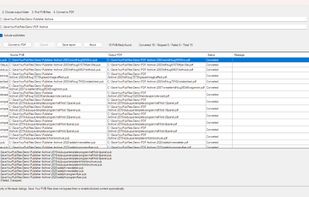
Save Your PUB Files desktop app showing batch conversion of multiple Microsoft Publisher .PUB files to PDF on Windows

Cost / License

  • Pay once
  • Proprietary

Platforms

  • Windows  Requires Microsoft Publisher to be installed on the Windows PC. Conversion is performed locally using the installed Publisher application.
0likes
0articles

Features

Save Your PUB Files News & Activities

Highlights All activities

Recent activities

Save Your PUB Files information

  • Developed by

    Unknown
  • Licensing

    Proprietary and Commercial product.
  • Pricing

    One time purchase (perpetual license) that costs $11.
  • Alternatives

    3 alternatives listed
  • Badge

    Get an embeddable badge for Save Your PUB Files
  • Supported Languages

    • English

AlternativeTo Category

Office & Productivity
Save Your PUB Files was added to AlternativeTo by ANotaBene on and this page was last updated .
No comments or reviews, maybe you want to be first?

What is Save Your PUB Files?

Save Your PUB Files is a Windows utility for people who need to preserve or migrate large collections of Microsoft Publisher .PUB files.

It can batch convert many Publisher files to PDF in one run, including entire folders with dozens or hundreds of .pub files, instead of opening and saving every file manually.

The conversion runs locally on the user's Windows PC. Files are not uploaded to a server.

The app is especially useful for organizations and individuals preparing existing Publisher archives before Microsoft Publisher support ends on October 1, 2026.

Key features:

  • Batch convert multiple .PUB files to PDF
  • Process entire folders
  • Local conversion on Windows
  • No file uploads
  • Simple graphical interface
  • Designed for large Publisher archives
  • One-time purchase, no subscription

Microsoft Publisher must be installed on the computer for conversion.