
S
S

SceneWright Studio

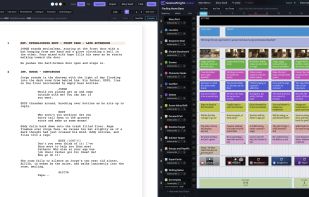
SceneWright Studio is a media-rich story planning and writing application. It takes the time proven index card method and digitizes it, adding almost every resource you could want on its own card.
SceneWright Studio screenshot 1

Cost / License

  • Subscription
  • Proprietary

Application type

Platforms

  • Software as a Service (SaaS)  Designed for desktop and laptop use
0likes
0articles

Features

Properties

  1.  Distraction-free
  2.  Support for Themes
  3.  Privacy focused

Features

  1.  Dark Mode
  2.  Cloud Sync
  3.  Real time collaboration
  4.  WYSIWYG Support
  5.  No Tracking
  6.  Hierarchical Structure
  7.  Ad-free
  8.  Storyboard
  9.  Screenwriting

SceneWright Studio News & Activities

Highlights All activities

Recent activities

SceneWright Studio information

  • Developed by

    US flagSceneWright Studio
  • Licensing

    Proprietary and Commercial product.
  • Pricing

    Subscription ranging between $12 and $29 per month.
  • Alternatives

    135 alternatives listed
  • Badge

    Get an embeddable badge for SceneWright Studio
  • Supported Languages

    • English

AlternativeTo Categories

News & BooksVideo & Movies
SceneWright Studio was added to AlternativeTo by Chris Lascelles on and this page was last updated .
No comments or reviews, maybe you want to be first?

What is SceneWright Studio?

SceneWright Studio provides a timeline similar to a video editor, onto which tracks are placed containing columns of moveable virtual index cards. These cards can contain text, images, music, videos, documents, and almost any internet resource. A special category of cards contain fully functional editors for screenwriting, and novel and non-fiction writing. There are cards for storyboards, whiteboards, and media-rich moodboards.

The app has Story Bible and Series Bible features, allowing the details of your story's characters, locations, culture etc. to be kept consistent as you plan and write.

Existing stories can be imported into SceneWright Studio, and export options include .fountain format for screenplays, as well as PDF, Word, and RTF.

Writers can collaborate on stories as co-writers on the Study and Writers' Room subscriptions.

SceneWright Studio solves the problem of staring at a blank page with no idea what to write. The planning timeline puts every detail of your story structure in front of you, along with the music, video, tutorials, and documents that inspire and guide you. Open the in-app editor and place it split-screen with the timeline, and write with maximum impact.

SceneWright Studio is made for desktop and laptop use. It is not made for mobile phone use as it uses a lot of screen real estate. Full large tablet support is on the development roadmap.
