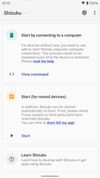
Shizuku icon
Shizuku icon

Shizuku

Facilitates efficient interaction with Android system APIs by granting elevated access to regular apps via adb or root privileges, leveraging a Java process for speed without modifying the system. Reduces complexity and broadens compatibility for advanced developers.
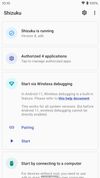
Shizuku screenshot 1
Shizuku screenshot 2

Cost / License

Application type

Platforms

  • Android
  • Android Tablet
  • F-Droid
  • OpenAPK
53likes
0articles

Features

  1.  No Root Required
  2.  Ad-free
  3.  Dark Mode
  4.  Inbuilt root Access
  5.  Privileged Access Management
  6.  No Tracking
  7.  No registration required
  8.  System Tweaker

Shizuku News & Activities

Highlights All activities

Recent News

No news, maybe you know any news worth sharing?
Share a News Tip

Recent activities

  • proxywork1 liked Shizuku
  • c17s5qhu updated Shizuku
  • kramermillay liked Shizuku
  • vv0wdr003f liked Shizuku
  • brokesimp69 liked Shizuku
  • anonymous94984834 liked Shizuku
  • Oklonsica liked Shizuku
  • Zorink liked Shizuku
  • dnylanderos liked Shizuku
  • ralaud liked Shizuku

Shizuku information

AlternativeTo Categories

OS & UtilitiesSystem & Hardware

GitHub repository

  •  30,185 Stars
  •  3,106 Forks
  •  598 Open Issues
  •   Updated  
View on GitHub
Shizuku was added to AlternativeTo by Paul on and this page was last updated .
No comments or reviews, maybe you want to be first?

Featured in Lists
My curated list of Free/Generous Freemium open source Android apps.

List by Serious Goose with 65 apps, updated
A list with 173 apps by namdx1987 without a description.

List by Nam Pham with 173 apps, updated

What is Shizuku?

Shizuku is a utility tool that provides elevated privileges to apps using the Android Debug Bridge (ADB) interface, eliminating the need for full device rooting. It allows users to activate advanced features in compatible apps without compromising their phone's operating system. Shizuku establishes a temporary connection, allowing these apps to perform complex tasks usually requiring root access.

Setting up Shizuku requires some technical skill to activate ADB and connect the device to a computer. Once set up, it enables compatible apps to operate with the necessary privileges smoothly. Shizuku does not require permanent system modifications, making it safe for users seeking advanced functionalities without risking device stability.

However, the use of ADB may deter less tech-savvy users. Despite the potentially intimidating initial setup, users willing to learn will find a powerful tool for enhancing app functionality.

Shizuku unlocks inaccessible features and bypasses system restrictions, making it useful for advanced customization and precise system control. By granting elevated privileges to supported apps, it allows for efficient operation and smarter app behavior, enhancing productivity and personalizing the mobile experience.