Shutter Utility icon

Shutter Utility

Shutter is a multifunctional scheduling utility, which has a user friendly and easy-to-use interface and supports many different Events and Actions.
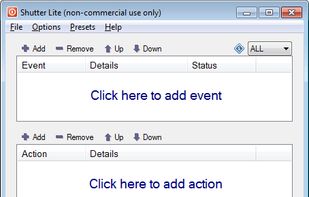
Main window

Cost / License

  • Free Personal
  • Proprietary

Platforms

  • Windows
14likes
0articles

Features

  1.  Portable
  2.  Planning
  3.  Scheduling
  4.  Task Scheduling

Shutter Utility News & Activities

Highlights All activities

Recent News

No news, maybe you know any news worth sharing?
Share a News Tip

Recent activities

No activities found.

Shutter Utility information

Our users have written 1 comments and reviews about Shutter Utility, and it has gotten 14 likes

Shutter Utility was added to AlternativeTo by hrasok on and this page was last updated . Shutter Utility is sometimes referred to as Shutter

Comments and Reviews

   
Guest
0

It is super-flexible in how you can pick the conditions (network, timer, CPU usage etc).

Review from a new or low-activity account — shown here, but not counted in the app rating.

Featured in Lists

A list with 14 apps by Otso_Grisak without a description.

List by Otso_Grisak with 14 apps, updated
A list with 47 apps by proxywork1 without a description.

List by proxywork1 with 47 apps, updated

What is Shutter Utility?

Shutter is a multifunctional scheduling utility, which has a user friendly and easy-to-use interface and supports many different Events and Actions.

Available events: Countdown, On Time, Winamp Stops, CPU Usage, Network Usage, Hard Disk Usage, User Inactive, Battery Low, Window, Process, Ping Stops, File Size Limit, Lid.

Available actions: Shutdown, Reboot, Log Off, Lock Workstation, Sleep, Hibernate, Turn Off Monitor, Screen Saver, Volume Control, Hang Up Modem, Alarm, Message, Play Sound, Run Program, Open File, Close Window, Kill Process.

Desktop links can be created to execute any of the supported actions directly from desktop. Web Interface allows remote execution of actions and displays run-time information about the computer: Up Time, List of Processes, Screenshot of a Desktop, Program Execution, and more.
