? Key Features
🎨 Intuitive User Interface: Modern WPF interface with light and dark themes, and customizable accent colors.
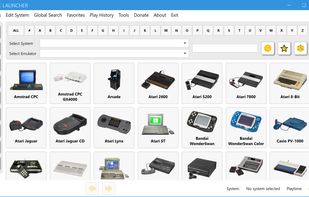
🎯 System Selection Screen: A visual way to choose your gaming platform.
🧭 Navigation Panel: Quick access to common actions like Global Search, Favorites, Play History, and UI adjustments (view mode, aspect ratio, zoom).
👁? Dual View Modes:
Grid View: Displays game covers as interactive buttons with optional overlay buttons for quick actions.
List View: Shows game details in a sortable table, including file size, play count, and playtime, with a preview image.
👶 Easy Mode: Simplifies adding new systems by automatically downloading and configuring common emulators and cores.
🎓 Expert Mode: Allows manual and detailed configuration of systems, emulators, paths, and launch parameters, including multiple ROM folders per system.
🔍 Global Search: Quickly find games across all your configured systems, supporting AND/OR logical operators.
? Favorites Management: Mark games as favorites for easy access.
?? Play History Tracking: See which games you've played, how many times, and for how long.
📊 Global Stats: Get an overview of your game library, including total systems, games, and image counts.
🖼? Fuzzy Image Matching: Helps find cover images even if filenames don't perfectly match (configurable threshold).
📦 Image Pack Downloader: Download pre-made image packs for various systems.
🖱? Context Menus: Rich right-click menus for games to launch, manage favorites, open external links (video/info), view local media (covers, snapshots, manuals), take screenshots, delete game files, and view RetroAchievements.
🎮 Gamepad Support: Navigate the UI using Xbox and PlayStation controllers (configurable deadzone).
?? Customizable UI: Adjust thumbnail sizes, button aspect ratios, and games per page.
🔊 Sound Configuration: Customize notification sounds and enable/disable sound effects.
🏆 RetroAchievements Integration: View game achievements, user profiles, game rankings, and unlock history directly in the launcher.
🔄 Automatic Updates: Keeps Simple Launcher up-to-date with the latest features and fixes.
🌐 Multilingual: Translated into 17 languages.
🔒 Single Instance Enforcement: Prevents multiple copies of the application from running simultaneously.
💾 On-the-Fly File Mounting: Allows users to launch games directly from compressed or disk image files without needing to manually extract them first (requires Dokan). This includes support for RPCS3 (.iso, .zip), Cxbx-Reloaded (.xiso), ScummVM (.zip), and XBLA (.zip).
📁 Group Files by Folder: Organizes multi-file MAME games into single entries, simplifying your game list. (Requires MAME emulator configuration. See Wiki for details.)







 Danilo_Venom added Simple Launcher (Emu front-end) as alternative to GameHub by Ziad_Nahouli
 justarandom added Simple Launcher (Emu front-end) as alternative to Daijisho
 justarandom added Simple Launcher (Emu front-end) as alternative to Cocoon Shell
 justarandom added Simple Launcher (Emu front-end) as alternative to tico
 justarandom added Simple Launcher (Emu front-end) as alternative to Lutris, RetroArch, OpenEmu and KRetro


 Peterson Fernandes

