




simplewall
215 likes
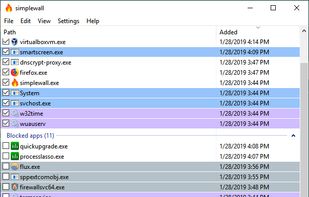
Simple tool to configure Windows Filtering Platform (WFP) which can configure network activity on your computer.


Features
simplewall News & Activities
Highlights All activities
Recent News
No news, maybe you know any news worth sharing?
Share a News TipRecent activities
 R0sbif added simplewall as alternative to Aegis-eBPF
- x-x liked simplewall
- zdozjdmzjdlek liked simplewall
- dimanesterchuk liked simplewall
it works, what else you need? also the dev is funny
- EXit liked simplewall
- ralaud liked simplewall
- mrcyodev liked simplewall
- dragonbiscuit liked simplewall

Featured in Lists

This is the apps for Windows 11 that I would recommend to anyone who just got a PC ! The same list...
List by Darlene Sonalder with 142 apps, updated

An alternative setup for Windows 11 focusing on open source and privacy-friendly alternatives. Also worth your while:...
List by andrealc with 37 apps, updated
You tired of Windows spyware but don't want to switch to a whole new operating system? Here are some open source...
List by RemovedUser with 21 apps, updated
What is simplewall?
simplewall information
Developed by
 Henry++
 Licensing
Open Source (GPL-3.0) and Free product.Written in
Rating
Average rating of 4.4Alternatives
39 alternatives listedBadge
Get an embeddable badge for simplewallSupported Languages

AlternativeTo Categories
Security & Privacy, Network & AdminGitHub repository
- 8,994 Stars
- 653 Forks
- 144 Open Issues
- Updated


Comments and Reviews
Free and open sourced! There's a portable version as well as setup version... x32 or x64... Customization interface, 17 languages, preset rules blocking Windows telemetry[619 Rules], blacklist/whitelist, customizable notifications for whitelist, dropped packet logging, in-client updates [no restart required], advanced rules such as boot-time filters [prevents leaking during boot(I recommend enabling)]... Windows firewall GUI is terrible, this is much easier to understand; much easier to edit. Previously I was using Kaspersky total security; after an account of mine was hijacked by some spyware... However during the last month of your Kaspersky license, it nags you, and is preventing windows from sleeping. Unlike paid/freemium firewalls there's nothing to nag you, no donations [in the main interface, there's a "give thanks" in the about window] or ads in the client etc. Even though it's open source they are constantly releasing builds, so no need to self compile, unless you don't trust anyone... Has an update feature, updates ask for approval, updates don't require a restart of the client. Hardware utilization Simplewall [x64] 2.4.6 Size: 1.10 MB (1,154,916 bytes) Size on Disk: 1.12 MB (1,176,120 bytes) [it's odd that windows is reporting size on disk to be larger than the size, normally size on disk is smaller] RAM usage 7.2 - 11mb depending on how many apps are listed/filters... CPU usage 0% - 0.5% [6700k] ; CPU usage when a notification is up/ when you change the interface styling
[Edited by Chaython, September 12] When there's 200 apps there's instability [hangs, when scrolling the application list]
EDIT: no longer recommend it. In v3.6.7 at some point Task Scheduler started constantly hogging the CPU when simplewall was on. Killing SW fixed the issue. At that time it's been a while since had I introduced any new firewall rules. And the dev's feedback was hollow
ORIGINAL COMMENT: Lightweight, easy to manage rules, open source. Comes with optional rules preventing Windows tracking and telemetry.
I tried to use this software for 6 months, because I was looking for a NetLimiter alternative which is free and don't have limiter functions. SimpleWall was recommended by a few people, so I gave it a try. What can I say, it is indeed free and somehow opensource, however looking at the issues it feels that community is quite discouraged to contribute. Functionality-wise, it is quite unusable in a modern software landscape, because tons of apps (like Fusion360, Dropbox, Codex, Creative Cloud, MS Teams, OneDrive, Visual Studio, etc) which downloads updates in different folders - meaning you will get an annoying, focus-catching popup every time one of those apps decides to update in background (which can be really often, depending on your installed software). Actually this issue (#1368) is open since 2023, but the author just closed it in 2026 without addressing. In NetLimiter or TinyWall you can configure a mask for the rule, which solves the problem, but not in the SimpleWall. On a positive side, the app works pretty well besides this issue, and does not consume much resources. However, without mentioned "filter by mask" feature is it hardly usable, and I reverted back to NetLimiter as more mature paid alternative.
it works, what else you need? also the dev is funny
Search bar constantly disappears after a few updates ago, wildcard paths will never be added (Dev said so himself). Crashing can and has happened before and even recently. Permanent red outline when using dark mode since the start. At the end of the day still one of the top FOSS Win firewalls.
lightweight, colorful interface, lots of features, can run in parallel with Windows Firewall...
A very good firewall!
Once properly configured, can be very useful in specific environments...
Simplewall is a lightweight, open-source firewall for Windows that leverages the Windows Filtering Platform (WFP) to provide granular control over network traffic.
It uses minimal resources, and is basically an easier way to handle Windows firewall.
The feature that keeps most people using it is its ability to block all apps from accessing the internet unless you allow them. It will create pop ups and you can allow, or allow with timer.
This is what I do when I install a new app, I allow it to run for 5-10 minutes to install, and then shut it off from the internet forever, until I need to install an update.
It also helps to block Windows telemetry systemwide, using the same lists that are used by uBlock Origins.
It has better features than TinyWall. It uses far less resources than Portmaster. It doesn't make you disable important Windows security measures like Fort Firewall.
Not perfect, and many people dislike it because the owner is an Eastern European with a bad attitude. But it's a good app. Really, if someone created the same mechanism for blocking all until user acceptance when it connects, this would have real competition. But no one does that in a user-friendly way yet.
It doesn't make you disable important Windows security measures like Fort Firewall.
But you did not mention that:
Simplewall does inglude GPG signatures for the binaries to verify and authenticity/integrity.
You mean that the individual man who built it, who is not from the West, does not pay for an expensive CA. I suppose he could try to get it through the app store cheap for that.
But can't you just create a task in task scheduler as admin, and use it on a standard account (if the reason you're not using an admin account for daily use is for security).
Simplewall does inglude GPG signatures for the binaries to verify and authenticity/integrity.
But it does not help with false positives of Windows Defender. (https://github.com/henrypp/simplewall/issues/1986)
I'm author of Fort Firewall, living in Uzbekistan (not from the West), and I use cheap Certum Open Source Code Signing certificate.
But can't you just create a task in task scheduler as admin, and use it on a standard account
No. (https://github.com/henrypp/simplewall/issues/2000)