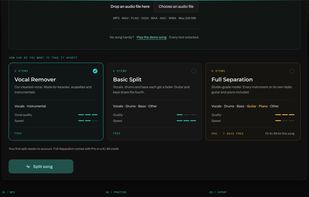
StemConsole is a browser-based stem splitter and practice room for musicians, singers, producers and teachers. Upload a song, choose how far apart you want it, and it separates the stems on GPU servers, then opens them in a live mixer where you can solo, mute and balance each part, loop a section and bounce your own mix.
Separation modes: Vocal Remover (2 stems, vocals and instrumental) and Basic Split (4 stems, vocals, drums, bass and other) are free. Full Separation (6 stems, adding guitar and piano on their own faders) is on Pro or a single $1.99 credit.
Practice room: slow a song down or speed it up without changing pitch, transpose the key without changing speed, save named loops, set the tempo with tap tempo and add a count-in before each pass. Pick the part you play and the mixer builds the balance for you: Hear my part solos it, Play with the band mutes it.
Library, sharing and setlists: every split is saved to your library so you can reopen it and pick up where you left off, and any split can be shared by link. The person you share with gets the stem player in their browser, with no account or install needed. Pro accounts can group songs into a setlist and share the whole set behind one link.
Free: Vocal Remover and Basic Split, 5 splits a month, the live mixer, basic looping, the saved library, share links, and MP3 downloads and mix bounces. The first split needs no account. No watermarks, no install.
Pro, $6.99 a month or $49 a year: Full Separation into 6 stems including guitar and piano, WAV stems and mix bounces, 100 splits a month, priority processing, setlists, and the full practice room. The monthly plan starts with a 7-day free trial.
A single $1.99 credit unlocks Full Separation for one song, without the practice tools.
Built by Dan Murtagh, a mixing engineer and audio educator in Melbourne, as a practice tool for his students.







 POX added StemConsole as alternative to Riffloop, StemSplitterAI, Coolo AI and moises.ai
 Dan Murtagh

