Strflow icon
Strflow icon

Strflow

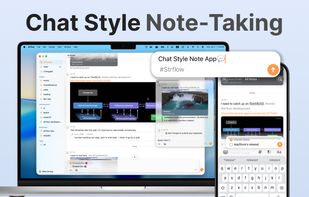
Strflow is built for writing things down the moment a thought occurs — like texting yourself, without worrying about structure.
Strflow screenshot 1

Cost / License

  • Freemium (Pay once or Subscription)
  • Proprietary

Application type

Platforms

  • Mac
  • iPhone
  • iPad
5likes
0articles

Features

Properties

  1.  Privacy focused
  2.  Lightweight

Features

  1.  Timeline-based
  2.  Cloud Sync
  3.  Ad-free
  4.  WYSIWYG Support
  5.  Works Offline
  6.  Dark Mode
  7.  End-to-End Encryption
  8.  Full-Text Search
  9.  Reminders
  10.  No registration required
  11.  Support for MarkDown
  12.  No Tracking
  13.  Sync with iCloud
  14.  Support for Keyboard Shortcuts
  15.  Tagging

Strflow News & Activities

Highlights All activities

Recent News

No news, maybe you know any news worth sharing?
Share a News Tip

Recent activities

  • Highlights: Diary icon
    Leo-Makkinje added Strflow as alternative to Highlights: Diary
  • Antinote icon
    Beatrix_021 added Strflow as alternative to Antinote
  • lilith888 liked Strflow
  • Beatrix_021 reviewed Strflow  

    I’ve been using Strflow for three years now, and I really love it.

    I especially like how easy it is to casually jot things down in a chat-like format, almost as if I’m talking to myself. Since I can add tags later, it’s also the perfect place to temporarily store thoughts and notes without worrying about organizing them right away.

    Recently, Strflow added locked tags, which has made it even more useful. Now I don’t have to worry about private notes unexpectedly showing up when I search on my...

  • Beatrix_021 liked Strflow
  • SupportJBT added Strflow as alternative to JotBantuek
  • Backtalk icon
    soul1472 added Strflow as alternative to Backtalk
  • SMBL Journal icon
    Mr-SheerLuck added Strflow as alternative to SMBL Journal
  • The PathMaker icon
    PathMaker added Strflow as alternative to The PathMaker
  • Spryvly icon
    Spryvly added Strflow as alternative to Spryvly

Strflow information

  • Developed by

    JP flagShingo Eguchi
  • Licensing

    Proprietary and Freemium product.
  • Pricing

    One time purchase ranging between $28 and $38, and / or subscription ranging between $1 and $2 per month + free version with limited functionality.
  • Alternatives

    85 alternatives listed
  • Badge

    Get an embeddable badge for Strflow
  • Supported Languages

    • English

AlternativeTo Categories

Office & ProductivitySecurity & Privacy

Apple AppStore

  •   Updated 
  •   4.96 avg rating

Popular alternatives

View all

Our users have written 1 comments and reviews about Strflow, and it has gotten 5 likes

Strflow was added to AlternativeTo by Paul on and this page was last updated .

Comments and Reviews

   
Beatrix_021
0

I’ve been using Strflow for three years now, and I really love it.

I especially like how easy it is to casually jot things down in a chat-like format, almost as if I’m talking to myself. Since I can add tags later, it’s also the perfect place to temporarily store thoughts and notes without worrying about organizing them right away.

Recently, Strflow added locked tags, which has made it even more useful. Now I don’t have to worry about private notes unexpectedly showing up when I search on my iPhone, for example. It’s a really convenient feature.

Review from a new or low-activity account — shown here, but not counted in the app rating.

Featured in Lists

alternatives to big name Company's products. spread the word! Also check out these lists for weaning yourself off...

List by Gaian Terra Canis Rufus with 46 apps, updated
De-Google (and friends) your life with these apps. Spread the word!

List by Gaian Terra Canis Rufus with 22 apps, updated

De-Apple {and friends} (as much as you can without having to buy an Linux Mobile Phone or buy a “Dumb Phone” [in place...

List by Gaian Terra Canis Rufus with 14 apps, updated

Official Links

What is Strflow?

Strflow is built for writing things down the moment a thought occurs — like texting yourself, without worrying about structure.

Every note flows into a chat-style, chronological timeline, exactly as it was written. Unstructured and immediate — because that’s how our brains often work.

Build Your Timeline

As you jot down notes, a personal timeline naturally forms.

With tags, you can also create timelines focused on specific topics. Tags can be attached or created from anywhere, and you can easily reorder them with drag & drop in the sidebar.

Todo & Reminders, Naturally in Your Timeline

Strflow turns your checklists into a dedicated Todo timeline, so you can easily review tasks, check them off, and add new ones from a single view.

You can also set notes for future dates and use them as reminders. Scheduled notes stay hidden until the right time, then gently surface with notifications—right when you need them.

Quick Notes Anywhere

Sync quickly and capture notes from anywhere. Open the app and start typing instantly, access Strflow from the share sheet — no need to switch apps.

Native on iOS

Strflow is designed natively for iOS, blending perfectly with its look and feel. It also integrates with system features like Apple Shortcuts and the share sheet—making it easy to fit into your workflow.

Your Data, 100% Yours

Your data is stored safely on your device and in iCloud. When saved to iCloud, it’s encrypted with your iCloud Keychain. For those using iCloud’s Advanced Data Protection, enjoy the added security of end-to-end encryption. All data can also be exported as Markdown, so you can take it anywhere with no lock-in.

A Powerful Editor

Strflow supports a wide range of rich-text editing features, including: • Link previews • Checklists • Note links • Inline formatting (bold, italic, etc.) • Block-level formatting (lists, code blocks, quote blocks, etc.) • Images