Getting better at a sport is not a search problem. It is a "what should I work on next, and which video actually teaches it" problem.
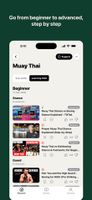
Subskills breaks every sport into its sub-skills and gives each one a short, reviewed list of free tutorials.
Badminton is not one topic. It is the backhand clear, the low serve, defence, footwork, net play — separate things to learn, each with its own best explanation. Subskills is organised that way.
WHAT'S INSIDE
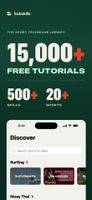
- Sports including badminton, tennis, padel, boxing, cycling, gym, pilates, running, soccer, surfing, swimming and yoga - with more added regularly
- 400+ sub-skills, each with its own shortlist
- 10,000+ free tutorials, every one reviewed before it appears
HOW YOU USE IT
- Discover: browse by sport, or search across every sport at once
- Learning Path: sub-skills grouped beginner to advanced, so you always know what comes next
- Levels: every tutorial tagged beginner, intermediate or advanced
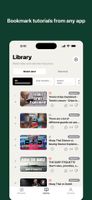
- Watch later: keep the ones worth returning to
- Watched: mark off what you have already done
- Vote: thumbs up or down; votes decide what stays near the top
- Suggest: send a link you rate. Suggestions are reviewed, not auto-published.
WHY IT IS DIFFERENT
Nothing is auto-published. Every tutorial is scored for relevance and teaching quality against the specific sub-skill it is filed under, and weak content is left out rather than buried on page four. You get a shortlist, not an endless feed.
No ads. No third-party trackers. Nothing about you is sold or shared. Everything is free to watch.
Browsing needs no account. Saving, marking watched, voting or suggesting creates a private library automatically. Add email, Google or Apple later to keep it across devices.










 Serhii-Knyr added Subskills as alternative to GymRoutines, Workout Cool, Liftlog and LibreFit




No comments or reviews, maybe you want to be first?