
TabRollback icon
TabRollback icon

TabRollback

TabRollback saves supported Chrome tabs and window layouts as recovery points on your own device. Enable protection, save manually or on a schedule, and inspect a restore rehearsal before reopening saved tabs in new windows. Your current windows remain open.
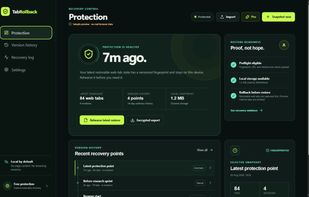
Protection overview — original app screenshot with labelled sample data, not customer activity.

Cost / License

  • Freemium
  • Proprietary

Application type

Platforms

  • Google Chrome  Desktop Chrome only.
0likes
0articles

Features

Properties

  1.  Privacy focused

Features

  1.  Ad-free
  2.  No registration required
  3.  Tab Manager

TabRollback News & Activities

Highlights All activities

Recent activities

TabRollback information

AlternativeTo Category

Web Browsers

Popular alternatives

View all
TabRollback was added to AlternativeTo by Darren BUCKLEY on and this page was last updated .
No comments or reviews, maybe you want to be first?

What is TabRollback?

TabRollback saves supported Chrome tabs and window layouts as recovery points on your own device. Enable protection, save manually or on a schedule, and inspect a restore rehearsal before reopening saved tabs in new windows. Your current windows remain open.

The free core includes 14 days of ordinary history, up to 60 recovery points, restore tools and password-protected encrypted import/export. Optional Pro extends ordinary history to 365 days and up to 500 recovery points. History and point-count limits both apply. Pro is an optional subscription: EUR 4.99/month or EUR 39.99/year, with tax calculated at checkout.

Saved browsing data is not uploaded by TabRollback. Encrypted exports are manual backups, not cloud sync. Protection begins only after you enable it; the extension cannot recover tabs lost before installation. Desktop Chrome only. This is an independent product, not affiliated with Session Buddy, OneTab or Google.