
Time Tracker for Browser icon

Time Tracker for Browser

Track time, analyze your habits and block addictive sites. It supports migrating your data from other alternatives, such as Web Activity Time Tracker and Webtime Tracker.
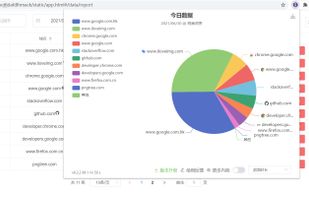
Time Tracker for Browser screenshot 1

Cost / License

  • Free
  • Open Source (MIT)

Application type

Platforms

  • Chrome OS
  • Microsoft Edge
  • Google Chrome
  • Opera
  • Mozilla Firefox
  • Brave
4likes
2comments

Features

Properties

  1.  Lightweight
  2.  Privacy focused

Features

  1.  Microsoft Edge extension
  2.  Real time collaboration
  3.  Browser extension
  4.  Dark Mode
  5.  Cloud Sync
  6.  Ad-free
  7.  No Tracking
  8.  Portable
  9.  No registration required
  10.  Works Offline
  11.  Calendar View
  12.  Time limit alerts

Time Tracker for Browser News & Activities

Highlights All activities

Recent News

Recent activities

Time Tracker for Browser information

  • Developed by

    CN flagSheepie Zhang
  • Licensing

    Open Source (MIT) and Free product.
  • Written in

  • Alternatives

    5 alternatives listed
  • Supported Languages

    • English
    • Chinese
    • Japanese
    • Spanish
    • Ukrainian
    • Portuguese
    • German
    • French
    • Arabic
    • Russian

AlternativeTo Categories

Web BrowsersDevelopmentOffice & ProductivityOS & Utilities

GitHub repository

  •  914 Stars
  •  68 Forks
  •  13 Open Issues
  •   Updated  
View on GitHub

Our users have written 2 comments and reviews about Time Tracker for Browser, and it has gotten 4 likes

Time Tracker for Browser was added to AlternativeTo by sheepzh on and this page was last updated .

Comments and Reviews

   
Top Positive Comment
Guest
2

It's very very interesting, and useful!!

Review by a new / low-activity user.
Quert
0

This is actually the best tracking chrome extension I have ever tried.

Recommended!

Review by a new / low-activity user.

What is Time Tracker for Browser?

Track time, analyze your habits and block addictive sites

Time Tracker - Web Habit Builder is a free, privacy-first web habit builder that automatically logs screen time, provides accurate analytics, and blocks distracting sites — keeping all data strictly local and under your control. 🚀

🌟 CORE CAPABILITIES

?? Track and Audit Time: Automatically monitor active web usage with a high-accuracy engine and active tab state detection. No account required. It ensures every second is correctly recorded for a truthful view of your screen time, featuring a 3-day rolling granular timeline with second-by-second precision for deep, exact activity auditing.

📊 Analyze Digital Habits: Gain deep insights through multidimensional reports. Visualize productivity by Site, Category, or Tab Group. Works fully offline with zero data leakage.

🛡? Block Addictive Sites: Reclaim your focus with an integrated website blocker. Set flexible time limits and rules to break addictive browsing cycles and maximize deep work.

🔍 Precision "Virtual Sites": Beyond domain tracking, define specific sub-page URLs (like a YouTube video or Notion doc) for granular monitoring once configured.

🔒 DATA OWNERSHIP AND TRANSPARENCY

🏠 Local-Only Storage: 100% of your history stays on your machine. The extension does not collect, store, or transmit your data to any remote servers.

?? User-Controlled Sync: You have the option to sync across devices using your own WebDAV, GitHub Gist, or Obsidian accounts. These connections are entirely managed and authorized by you.

?? MIT Licensed: Transparent and audit-ready code under the MIT License. No hidden tracking, no subscriptions.

🔄 SEAMLESS TRANSITION

📥 One-Click Import: Easily migrate from Webtime Tracker or Web Activity Time Tracker without losing your history. 💻 Cross-Browser: Native support for Chrome, Firefox, and Edge with automatic Dark Mode.

? View Source Code: https://github.com/sheepzh/time-tracker-4-browser ? Submit Issues: https://github.com/sheepzh/time-tracker-4-browser/issues
