





Tinta
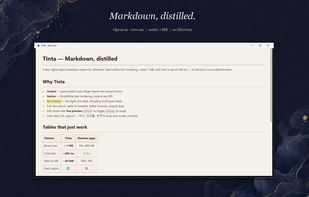
Tinta is a fast, lightweight markdown viewer and reader for Windows, built with Direct2D and DirectWrite for hardware-accelerated text rendering. It's a single portable executable under 1 MB that starts in about 200 ms — no Electron, no bundled browser, no installer.

Cost / License
- Free
- Open Source (MIT)
 EU
EUPlatforms
- Windows


Features
Tinta News & Activities
Recent activities
- bnchndlr liked Tinta
Tinta is very small and does not need an installation, because the downloaded executable file runs out of the box.
The preferences include some (light and dark) themes and some useful other options like setting the text width. F11 fortunately works for full-screen view (which is not always the case with free software). And you can export as HTML, PDF or DOCX.
Too bad: I could not find a way to set the font family or font size. But the text is scalable at least.
But I have to say: This is a...
- sterno900 added Keyboard Shortcuts as a feature to Tinta
- sterno900 added Markdown preview as a feature to Tinta
- sterno900 added Support for Keyboard Shortcuts as a feature to Tinta
So fast and so light
- sterno900 liked Tinta
- niksavc liked Tinta
- oipoistar added Tinta
 oipoistar added Tinta as alternative to Typora, MarkText, Zettlr and Clearly Markdown

Tinta information
Developed by
 oipoistar
 Licensing
Open Source (MIT) and Free product.Written in
Alternatives
5 alternatives listedBadge
Get an embeddable badge for TintaSupported Languages

AlternativeTo Category
OS & UtilitiesGitHub repository
- 170 Stars
- 21 Forks
- 0 Open Issues
- Updated


Comments and Reviews
Tinta is very small and does not need an installation, because the downloaded executable file runs out of the box.
The preferences include some (light and dark) themes and some useful other options like setting the text width. F11 fortunately works for full-screen view (which is not always the case with free software). And you can export as HTML, PDF or DOCX.
Too bad: I could not find a way to set the font family or font size. But the text is scalable at least.
But I have to say: This is a reader only, not an editor, which kind of makes it unnecessary for me.
So fast and so light