




tinySpell
16 likes
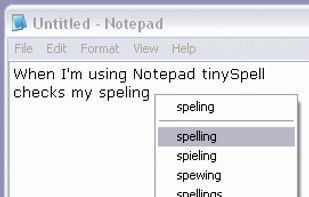
Occasionally you need to check spelling in an application that does not include a spelling checker and you dont want to launch your word processor just for that. This is when tinySpell becomes handy. It is a small utility that allows you to easily and quickly check and correct...

Cost / License
- Freemium (Pay once)
- Proprietary
Platforms
- Windows


Features
tinySpell News & Activities
Highlights All activities
Recent activities
No activities found.
What is tinySpell?
tinySpell information
Developed by
 KEDMI Scientific Computing
 Licensing
Proprietary and Freemium product.Pricing
One time purchase (perpetual license) + free version with limited functionality.Alternatives
7 alternatives listedBadge
Get an embeddable badge for tinySpellSupported Languages


Comments and Reviews
Even in 2019 there are still a lot of programs without native spell check many of which are used for on-the-fly social situations where it's really embarrassing not to get typos caught. TinySpell has some quirks and isn't suitable for some programs, but over all it has been a major life savor and I couldn't imagine using a computer without it and not having my stress level skyrocket.
+Works in windows 10 +White or Black list applications +Optional Auto Replace +Size Options make it easier to read on 1440p and 4k screens. +Easy to use with only the keyboard +Beep Can be enabled/disabled per application or globally.
Maybe should pay for it and get the multiple dictionary thing.
I've been using since for years and have never had a problem. A great time saver!