Tolstoy Compose is a professional writing application built for longer, structured work as well as everyday writing. Keep your main writing, notes, research, citations, feedback and earlier versions all in one place.
Use Compose in your browser or install it as a Progressive Web App on desktop, tablet and phone. Documents stay on your device or in files you choose to save. This local-first approach keeps your writing private and under your control. Compose can continue working offline. There are no AI features or writing tools, so you remain in full control of your work.
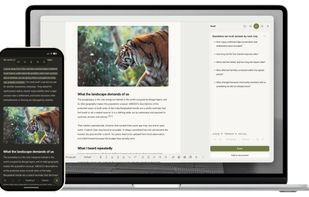
The tools panel keeps essential writing features close when you need them and it can be hidden when you want to focus only on writing:
• Each document has a Shelf for notes, ideas and research, so supporting material stays with the right piece of writing. Notes can be organised with tags and pins, searched and filtered later, or added directly into the document when you are ready to use them.
• Citation management is built into the writing process. Add books, journal articles, websites, book chapters, theses and conference papers, or enter a DOI and let Compose fill in the available source details for you to review. Save and reuse sources without entering them again, create footnotes and bibliographies, and choose from APA, MLA, Chicago, Harvard, Vancouver and IEEE citation styles.
• Review lets you and the people you share your writing with add comments and suggest changes. Feedback stays linked to the relevant words, making it clear what needs attention, and you choose which changes to accept or disregard.
• Automatic versions are saved while you write, helping protect your work and letting you return to an earlier draft. Manual snapshots let you preserve important milestones.
Compose can export documents as a Compose file, Microsoft Word document, PDF, Markdown, HTML or plain text. Professional PDF tools give you control over covers, page size, margins, tables of contents, running titles, page numbers, sections, columns and page breaks, with a preview of the finished document before you export it. Word export keeps your work editable and preserves structured content including tables, citations, native Word footnotes, sections, columns and page breaks.
You can start writing for free without an account or document and word limits. Pro expands the research, review and version features and adds professional Word and PDF output. Teams gives each member the Pro features together with central member management and dedicated Team Spaces, while each person's documents remain local and private.







 CreatedbyBhavesh added Tolstoy Compose as alternative to Scrivener, Zettlr, Ulysses and Roam Research


 Bhavesh Prabhakar

