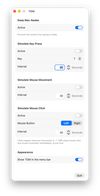
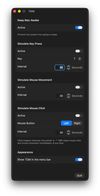
A small macOS utility with a window and an optional menu bar icon. Four independent functions:
Keep Mac Awake – uses an IOKit power assertion to stop the display and the system from going to sleep. No special permission required.
Simulate Key Press – sends a real key press via CGEvent at a chosen interval (1–600 seconds). Pick the key from a list (letters, numbers, arrow keys, special keys such as Space/Return/Control, and F13–F19); the labels follow the active keyboard layout (QWERTZ, AZERTY, …). Starts after a 5-second countdown so you can bring the target window to the front. Handy for staying "active" in games, for example.
Simulate Mouse Movement – moves the pointer one pixel and immediately back at the chosen interval. No click, no visible movement.
Simulate Mouse Click – clicks with the left or right mouse button at the current pointer position at the chosen interval (0.1 s or slower). Starts after a 5-second countdown and shuts itself off automatically after 8 hours.
Safety: ^??K stops mouse click and mouse movement immediately, no matter which app is in the foreground. Mouse movement and mouse click are mutually exclusive, and their on/off states are deliberately not restored on launch — an app that starts clicking by itself after a restart would be dangerous.
The functions run independently of each other; settings are preserved across restarts.
TOM Screenshot
Requirements
macOS 13 (Ventura) or newer
Apple Silicon (arm64)
Download
Grab the latest build from the Releases page, unzip it and move TOM.app to your Applications folder.
The app is not notarized, so macOS will refuse to open it on first launch. Go to System Settings ? Privacy & Security, scroll down to the message about TOM and click Open Anyway.
Languages
The interface is available in English, German and Spanish, selected automatically from the system language. Unsupported languages fall back to English.
To try a language without changing your system settings, launch the binary directly:
TOM.app/Contents/MacOS/TOM -AppleLanguages '(es)'
Permissions
Keep Mac Awake: none.
Key press, mouse movement and mouse click: require the Accessibility permission (System Settings ? Privacy & Security ? Accessibility). The app asks for it the first time you switch one of them on and links straight to the right pane. Note: after rebuilding with an ad-hoc signature, macOS treats the app as new, so the permission may have to be granted again (toggle the checkbox off and on).
The app is not sandboxed — required for CGEvent injection.
License
Copyright (C) 2026 NeonRost
This program is free software, released under the GNU General Public License, version 3 (or, at your option, any later version). See the LICENSE file for details.






 EU
EU
 NeonRost added TOM - Tuco on Meth as alternative to Amphetamine, Caffeine for Windows, Caffeine for Mac and Mouse Shaker
 NeonRost

