T
T

Tymo

Time is always moving – quietly, constantly. Tymo helps you stay connected to it. Whether you’re counting down to a work or personal event, Tymo keeps your focus sharp and your time organized.
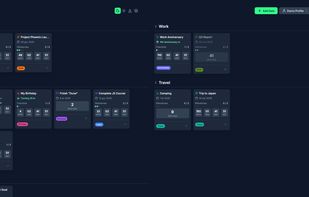
Dashboard – default Dark theme

Cost / License

  • Free
  • Open Source

Application type

Platforms

  • Online
  • Self-Hosted
3likes
0articles

Features

Properties

  1.  Lightweight

Features

  1.  Subtasks
  2.  No Coding Required
  3.  Kanban Board
  4.  No registration required
  5.  Works Offline
  6.  Portable
  7.  Dark Mode
  8.  Ad-free

 Tags

Tymo News & Activities

Highlights All activities

Recent activities

  • ittikorn-longtee added Tymo as alternative to WanaGo
  • Fozolina added Tymo as alternative to ArevTab
  • thecrabagenda liked Tymo
  • f4llcon added Tymo as alternative to Revelation Tab
  • yashkapoor added Tymo as alternative to Tabisto
  • POX added Tymo as alternative to Wait Menu
  • breeze_winter added Tymo as alternative to Dream Afar
  • niksavc liked Tymo
  • eluzja added Tymo as alternative to Thinboard
  • eluzja liked Tymo

Tymo information

AlternativeTo Categories

Office & ProductivityOnline Services

GitHub repository

  •  2 Stars
  •  0 Forks
  •  0 Open Issues
  •   Updated  
View on GitHub

Popular alternatives

View all
Tymo was added to AlternativeTo by eluzja on and this page was last updated .
No comments or reviews, maybe you want to be first?

Official Links

What is Tymo?

Time is always moving – quietly, constantly. Tymo helps you stay connected to it. Whether you’re counting down to a work or personal event, Tymo keeps your focus sharp and your time organized.

Use it to track: • Product launches & critical deadlines • Upcoming trips & vacations • Birthdays, anniversaries & other events • Personal goals & habits

Tymo handles special dates, like birthdays and anniversaries, automatically. It can also track remembrance dates to honor loved ones.

Completed tasks are grayed out, keeping your dashboard clean.

You can: • Add milestones (checklists), notes, and an icon to each card. • Drag groups or individual cards to re-order your dashboard. • Create separate profiles for 'Work', 'Home', etc. • Change the column count. • Choose your favorite look. The theme is saved to your current profile. • Export/import all your data.