
vaho icon
vaho icon

vaho

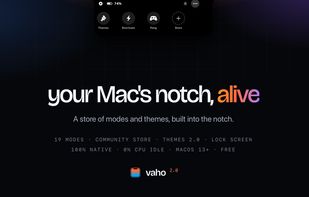
Media, alerts and files in the one spot of your screen that's always in sight — plus a store of community modes and themes, whole-desktop themes and lock-screen widgets. Native, free to start.
vaho screenshot 1

Cost / License

  • Freemium (Pay once)
  • Proprietary

Platforms

  • Mac
3likes
0articles

Features

Properties

  1.  Support for Themes
  2.  Customizable

Features

  1.  Ad-free
  2.  Works Offline
  3.  No registration required
  4.  Extensible by Plugins/Extensions
  5.  Dark Mode
  6.  Lockscreen Widget
  7.  Separated workspaces
  8.  Workspaces
  9.  Apple Silicon support

vaho News & Activities

Highlights All activities

Recent activities

  • Daniel_gpf commented on vaho

    Honest question, not a knock — how does vaho differ from Notchy in practice? From the outside they look like they cover similar ground and I can't tell which one fits which use case. Is there something vaho does that Notchy doesn't, or is it more about the approach?

  • dhruvi-306 liked vaho
  • anastasiaburakova57 liked vaho
  • ZOF liked vaho
  • NotchNook icon
    POX added vaho as alternative to NotchNook, Vibe Island, ActivSpot and The Boring Notch + 34 similar activities
  • POX added vaho

vaho information

  • Developed by

    Jorge Martinez
  • Licensing

    Proprietary and Freemium product.
  • Pricing

    One time purchase (perpetual license) that costs $6 + free version with limited functionality.
  • Alternatives

    34 alternatives listed
  • Badge

    Get an embeddable badge for vaho
  • Supported Languages

    • English

Our users have written 1 comments and reviews about vaho, and it has gotten 3 likes

vaho was added to AlternativeTo by Paul on and this page was last updated .

Comments and Reviews

   
Daniel Gomez
0

Honest question, not a knock — how does vaho differ from Notchy in practice? From the outside they look like they cover similar ground and I can't tell which one fits which use case. Is there something vaho does that Notchy doesn't, or is it more about the approach?

What is vaho?

Media, alerts and files in the one spot of your screen that's always in sight. And now a whole store of modes and themes — vaho's own, and the ones the community makes.

Missing a mode? Write it.

A community mode is a folder of HTML, CSS and JavaScript that vaho draws inside the notch. The guide takes you from zero to your first mode in an afternoon.

vaho hands the mode one bridge, window.vaho, carrying exactly what its manifest asked for. No Xcode, no build step, nothing to sign.

  • A real sandbox: A community mode runs in an isolated web view: no network, no files, no reach into other apps, except what its manifest asks for — and that list is on screen before you install.
  • Validated, then published: Every upload runs through automated validation — manifest, size, file types, duplicates. Anyone can report a mode, and one can be taken down.
  • Yours, even unpublished: A folder in ~/.config/vaho/webmodes/ is already an installed mode. Edit, hit Reload, repeat. Nothing to compile.

Your whole Mac, saved under a name.

A theme is no longer just a wallpaper. It captures 32 different sources: the desktop picture, vaho, the macOS appearance, the Dock, Finder, the menu bar, the pointer, the sounds — plus your terminal, your editor and your desktop tooling. One tap applies it, one file exports it, one click shares it.

Locked isn't blank.

When the session locks, the notch grows into a small strip of widgets drawn over the lock screen: what's playing, your next event, batteries, and how many alerts are waiting. You pick which ones, and how high they sit. Nothing here can unlock the Mac — it's a readout.

  • Media player: Album art, title and playback controls for what's playing.
  • Next event: Your next calendar event and when it starts.
  • Battery: The Mac's, plus AirPods, mouse and keyboard when they report one.
  • Notification counts: How many alerts are waiting per app. Only icons and numbers — no text.