

Vice Versa icon
Vice Versa icon

Vice Versa

Vice Versa allows you to seamlessly convert selected text between Hebrew and English with a single click. The extension operates locally, requiring no internet connection, ensuring your privacy.
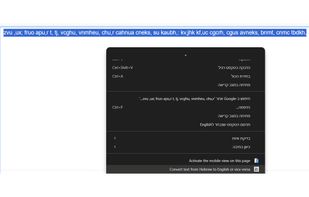
Marked English gibberish before the use of Vice Versa

Cost / License

  • Free
  • Proprietary

Platforms

  • Google Chrome
0likes
0articles

Features

Vice Versa News & Activities

Highlights All activities

Recent activities

No activities found.

Vice Versa information

AlternativeTo Categories

Office & ProductivityOS & UtilitiesWeb Browsers

Popular alternatives

View all

Our users have written 1 comments and reviews about Vice Versa, and it has gotten 0 likes

Vice Versa was added to AlternativeTo by rotemkanon-dev on and this page was last updated .

Comments and Reviews

   
Guest
0

Very useful when you write a full sentence and suddenly realized that the keyboard was set to the wrong language

Review from a new or low-activity account — shown here, but not counted in the app rating.

What is Vice Versa?

Vice Versa allows you to seamlessly convert selected text between Hebrew and English with a single click. The extension operates locally, requiring no internet connection, ensuring your privacy. With its simple interface and efficient functionality, Vice Versa is perfect for everyday use.

To use Vice Versa, mark the gibberish and press the key combination Ctrl+Alt or choose the option from the right click menu.

Vice Versa Videos