Run Virtual Android OS in an App
Virtual Master runs another Android
System on your device, based on our
Android on Android Virtualization
Technology.
With Virtual Master, you can have another
Android System running on your device,
isolated from the Android System of your
device.
The new Android System is equivalent to a
Parallel Space, or a Virtual Phone, similar
to a Cloud Phone, but runs locally.
In the new Android System, you can install
its own Apps, arrange its own Launcher,
set its own Wallpaper, and customize it as
your needs.
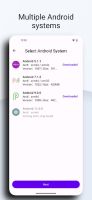
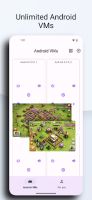
You can run multiple Android Systems
in Virtual Master, One for Work, One for
Game, One for Privacy, and enjoy more fun
on one device.
It's an Android Virtual Machine, just like
your another phone!
- Play with multiple Social or Game
Accounts at the same time
Games and Apps are cloned after being
imported into Virtual Master.
We support almost all Social Apps and
Games, meaning you can have dual
WhatsApp, Sharechat, Snapchat, FreeFire,
and more.
You can sign in to multiple Accounts at
the same time on one device and switch
between them freely.
- Run multiple Apps or Games at the same
time
We support background running, that
means the Apps and Games can keep
running when in background.
So, for example, you can run a game in
Virtual Master, but watch a video on your
device at the same time.
Just like bringing the emulators such as
Bluestacks and Nox to your device.
- Support Vulkan
We support Vulkan in the Virtual Android
System, so you can run many high-end
games smoothly in Virtual Master.
- Protect your Privacy
When Apps and Games run in the Virtual
Android System, they can not get any
information about your device, like
contacts, sms, device id, etc.
So, you can run any Apps or Games in
it without worrying about leaking your
privacy. It can be used as your Privacy
Sandbox.







 POX added Virtual Master as alternative to SeekPrivacy
 POX added Virtual Master as alternative to Parall


