


vscode.dev
14 likes
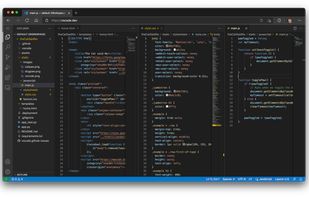
Online VScode editor.

Cost / License
- Free
- Open Source (MIT)
Application type
Platforms
- Online
- Self-Hosted

Features

vscode.dev News & Activities
Highlights All activities
Recent News
No news, maybe you know any news worth sharing?
Share a News TipRecent activities
- DGNTool liked vscode.dev
- Martin-Milan liked vscode.dev
- ssiroos liked vscode.dev
- iamusmankhan045 liked vscode.dev
Perfect for emergency code fixes when you're away from your dev machine.
- wwwlxz liked vscode.dev
 fachaaccou added vscode.dev as alternative to Pterocos
- shaishavap added Dark Mode as a feature to vscode.dev
- shaishavap added Autocompletion as a feature to vscode.dev
- shaishavap added Distraction-free as a feature to vscode.dev


vscode.dev information
Developed by
 Microsoft
 Licensing
Open Source (MIT) and Free product.Alternatives
25 alternatives listedBadge
Get an embeddable badge for vscode.devSupported Languages
AlternativeTo Category
DevelopmentGitHub repository
- 4,738 Stars
- 1,363 Forks
- 216 Open Issues
- Updated (Archived)


Featured in Lists

A list of code editors or extensions/plugins that support PowerShell — exclusively or with other languages, whether...
List by TMA_2 with 18 apps, updated

A list with 22 apps by kaekazeh without a description.
List by kaekazeh with 22 apps, updated
Comments and Reviews
Perfect for emergency code fixes when you're away from your dev machine.
vscode.dev gives you the VS Code interface directly in your browser, with no installation. Most useful when you're on a machine you can't install software on, or when you just need a quick edit without opening a full IDE.
The GitHub integration is the standout feature — change the URL of any GitHub repo from github.com to github.dev and it opens instantly in vscode.dev. Great for reviewing pull requests, reading unfamiliar codebases, or making quick file edits and committing directly.
Limitations worth knowing: no integrated terminal, no debugger, and only a subset of extensions work in the browser runtime. For anything beyond editing and navigation, you still need the desktop app or a Codespace.
For what it is — a zero-install, browser-native editor — it's excellent. Especially on a Chromebook or a locked-down work machine.