Whistle Synth lets you control a synthesizer by whistling.
It listens to your mic, quickly works out what note you're on, and plays that back on a synth voice. It follows pitch continuously, so you can slide and bend, and it tracks how loud your whistle is, which is what most of the voices use for their dynamics. It is monophonic: one note at a time, the one you are whistling.
TWELVE VOICES
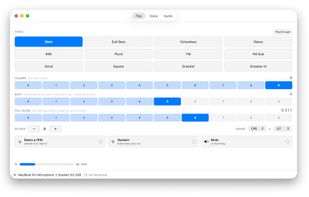
Bass, Sub Bass, Octaveless, Reese, 808, Pluck, FM, FM Sub, Grind, Square, Drawbar and Drawbar Hi, plus a Passthrough for setting your input level and your gate.
PLAYING IT
Plug in an external mic or headphones, so you don't get feedback. Whistle into the mic, keeping it as close to your mouth as possible. Listen to the synth.
Down a fifth plays every voice a fifth below what you whistle: a tune whistled in D comes out in G.
Sustain lets you play a note and have it continue after you stop, which is good for accompanying yourself on another instrument. Unlike the rest of Whistle Synth, this snaps to the nearest concert pitch note. It's triggered by playing a note over half a second long, and stopped by playing a short note.
An octave shift and a settable range mean a whistle can drive a bass line four octaves down, which is the biggest reason to use the app.
Mute is on the M key, with no modifier, to make it as fast as possible to mute if it's not doing what you want.
THE VOICE EDITOR
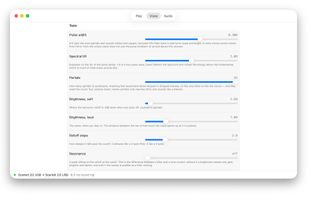
Every parameter of the current voice is on its own tab, each with a sentence saying what it actually does: pulse width, spectral tilt, how many partials to synthesize, how bright the voice is when you back off against when you lean in, the rolloff slope, resonance, and the rest. You can learn a fair amount of synthesis by turning the knobs and reading.
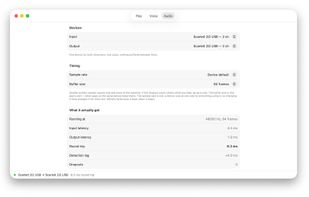
THE AUDIO TAB
Choose input and output device, sample rate and buffer size, and then see what you actually got: input latency, output latency, round trip, detection lag, and a dropout count. On an audio interface at 64 frames this runs at a few milliseconds round trip, which is the difference between an instrument and a delay pedal.
The audio device is borrowed, not taken. Whistle Synth starts on your device's default sample rate, and puts back anything it changed when it stops.
YOU NEED HEADPHONES OR A SEPARATE MICROPHONE
On a typical Mac the built-in microphone and the built-in speakers are a few inches apart, so the synth hears its own output and howls. Whistle Synth will not run that route at all. Connect headphones (wired for low latency) or an external microphone (as close as possible to your mouth). A good microphone (SM58 or better) into an audio interface gives best performance.
PRIVACY
Audio is processed on your Mac. Nothing is recorded, nothing is saved, nothing is sent anywhere. No account, no analytics, no network access.










 Jeff Kaufman