
Window Center & Resizer icon

Window Center & Resizer

Press a shortcut and the active window goes where you told it to. You say where by dragging a window inside a picture of your own screen. That is the entire program.
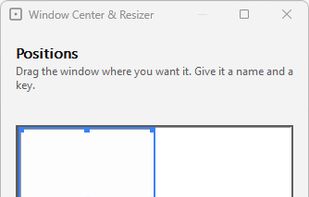
A Settings Window

Cost / License

Application type

Platforms

  • Windows
0likes
0articles

Features

Properties

  1.  Lightweight
  2.  Configurable

Features

  1.  Portable
  2.  Ad-free
  3.  Works Offline
  4.  No registration required
  5.  No Tracking
  6.  Global hotkey

Window Center & Resizer News & Activities

Highlights All activities

Recent activities

Window Center & Resizer information

AlternativeTo Category

OS & Utilities

GitHub repository

  •  38 Stars
  •  0 Forks
  •  0 Open Issues
  •   Updated  
View on GitHub
Window Center & Resizer was added to AlternativeTo by AltSaru on and this page was last updated .
No comments or reviews, maybe you want to be first?

What is Window Center & Resizer?

The Open-Source Utility for Centering and Resizing Windows

Window Center & Resizer is a utility application for Windows that allows you to easily center and resize windows on your desktop using customizable keyboard shortcuts. It is a 630 KB download — nothing to install, and no runtime to bring along.

  • Named positions: Put the active window where you want it, with one keystroke. A position is a name, a hotkey, and a place on the screen — and you set that place by dragging a window inside a picture of your own screen, rather than by typing coordinates. Centring is one of these, and it is the one that ships.

  • Keep the size, or set it: A position can move a window without touching its size, or give it a size as a percentage of the screen. "Put this on the left but leave it as big as it is" is a position, not a compromise.

  • Resize cycle: A separate key cycles the active window through three size presets, given as a percentage of the screen's work area. The defaults are 50%, 75% and 90%, all editable. It re-centres the window as it goes, exactly as it always has.

  • Customizable keybinds: Every position carries its own hotkey, and the resize key is yours to choose.