





Color Picker Pro by BinaryMark
1 like
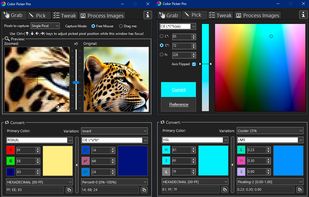
Grab single or multiple pixel colors anywhere on your screen in more than 50 different formats. Convert colors between any of the 17 color models like RGB, HSL, Lab, LCH, XYZ. Choose from over 100 color variations: invert, contrast, warmer, darker...

Cost / License
- Freemium (Pay once)
- Proprietary
Application type
Platforms
- Windows


Features
Color Picker Pro by BinaryMark News & Activities
Highlights All activities
Recent activities
- binarymark updated Color Picker Pro by BinaryMark
- binarymark added color converter as a feature to Color Picker Pro by BinaryMark
 upclimb added Color Picker Pro by BinaryMark as alternative to Online Color Picker
 Deminimis added Color Picker Pro by BinaryMark as alternative to Minimal Color Picker
 POX added Color Picker Pro by BinaryMark as alternative to ColorSmith
 POX added Color Picker Pro by BinaryMark as alternative to Cherrypick


Color Picker Pro by BinaryMark information
Developed by
 BinaryMark
 Licensing
Proprietary and Freemium product.Pricing
One time purchase (perpetual license) + free version with limited functionality.Alternatives
47 alternatives listedBadge
Get an embeddable badge for Color Picker Pro by BinaryMarkSupported Languages


No comments or reviews, maybe you want to be first?