Windows Timeline Support icon

Windows Timeline Support

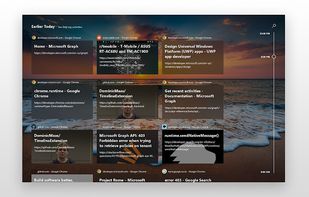
Automatically sync your browsing history to your Windows 10 PC with Windows Timeline. Push active websites to any of your devices.
Windows Timeline Support screenshot 1

Cost / License

  • Free
  • Open Source (MIT)

Platforms

  • Windows  [https://chrome.google.com/webstore/detail/windows-timeline-support/meokcjmjkobffcgldbjjklmaaediikdj](https://chrome.google.com/webstore/detail/windows-timeline-support/meokcjmjkobffcgldbjjklmaaediikdj)
  • Vivaldi Browser
  • Google Chrome  [https://chrome.google.com/webstore/detail/windows-timeline-support/meokcjmjkobffcgldbjjklmaaediikdj](https://chrome.google.com/webstore/detail/windows-timeline-support/meokcjmjkobffcgldbjjklmaaediikdj)
  • Opera  [https://chrome.google.com/webstore/detail/windows-timeline-support/meokcjmjkobffcgldbjjklmaaediikdj](https://chrome.google.com/webstore/detail/windows-timeline-support/meokcjmjkobffcgldbjjklmaaediikdj)
  • Chromium  [https://chrome.google.com/webstore/detail/windows-timeline-support/meokcjmjkobffcgldbjjklmaaediikdj](https://chrome.google.com/webstore/detail/windows-timeline-support/meokcjmjkobffcgldbjjklmaaediikdj)
  • Firefox
Windows Timeline Support screenshot 1
Alternatives
0likes
0alternatives
0articles

Features

  1.  Synchronization
  2.  Continuity

Windows Timeline Support News & Activities

Highlights All activities

Recent activities

No activities found.

Windows Timeline Support information

AlternativeTo Category

Backup & Sync

GitHub repository

  •  485 Stars
  •  24 Forks
  •  21 Open Issues
  •   Updated  (Archived)
View on GitHub
Windows Timeline Support was added to AlternativeTo by magdygamal on and this page was last updated .
No comments or reviews, maybe you want to be first?

Official Links

What is Windows Timeline Support?

Windows Timeline Support provides deeper Windows 10 integration features into Google Chrome such as Windows Timeline activities and Project Rome.

• Sync your browsing history to Windows Timeline, access it at a later date or on another device with the same Microsoft Account.

• Adjust how many seconds you have to be on a page before it's stored in Windows Timeline (by default, 8 seconds).

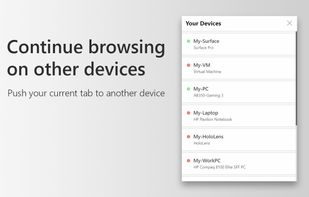
• Continue browsing on another device quickly by 'pushing' your current active tab to other devices sharing the same Microsoft Account.