





WinMice
Like
Windows-style autoscroll (middle-click vector scrolling) and back/forward mouse side buttons for macOS. Tiny native Swift menu-bar app, about 1.7 MB, no Electron.
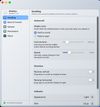

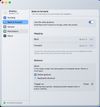

+2
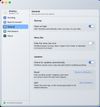

Cost / License
- Free
- Open Source (MIT)
 EU
EUPlatforms
- Mac
Add Alternatives


WinMice
Like
0likes
0alternatives
0articles
Features
WinMice News & Activities
Highlights All activities
Recent activities
- anibalcatheringer-ops added WinMice
WinMice information
Developed by
 Aníbal Ribeiro
 Licensing
Open Source (MIT) and Free product.Written in
Alternatives
0 alternatives listedBadge
Get an embeddable badge for WinMiceSupported Languages

AlternativeTo Categories
OS & Utilities, GamesGitHub repository
- 45 Stars
- 0 Forks
- 0 Open Issues
- Updated
No comments or reviews, maybe you want to be first?