

xnotes icon
xnotes icon

xnotes

xnotes is a handwriting-first notebook for phones and tablets, built for pen and stylus. Write, sketch and annotate with pressure-sensitive, variable-width ink, and nothing you draw is ever flattened.
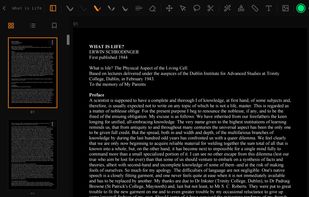
xnotes screenshot 1

Cost / License

  • Free
  • Open Source (MIT)

Platforms

  • Android
  • Android Tablet
  • F-Droid
0likes
0comments
0articles

Features

Properties

  1.  Privacy focused

Features

  1.  Handwritten Notes
  2.  Non Destructive Editing
  3.  No Tracking
  4.  Pressure Sensitivity
  5.  Works Offline
  6.  Dark Mode
  7.  No registration required
  8.  PDF annotation
  9.  Ad-free
  10.  Annotate Screenshot
  11.  Support for styluses
  12.  Text Highlighting
  13.  Handwriting
  14.  Sketching
  15.  Image Annotations
  16.  Notebook

xnotes News & Activities

Highlights All activities

Recent activities

xnotes information

  • Developed by

    shardulvs
  • Licensing

    Open Source (MIT) and Free product.
  • Alternatives

    51 alternatives listed
  • Supported Languages

    • English

AlternativeTo Categories

Photos & GraphicsOffice & Productivity

GitHub repository

  •  20 Stars
  •  1 Forks
  •  5 Open Issues
  •   Updated  
View on GitHub
xnotes was added to AlternativeTo by Paul on and this page was last updated .
No comments or reviews, maybe you want to be first?

What is xnotes?

xnotes is a handwriting-first notebook for phones and tablets, built for pen and stylus. Write, sketch and annotate with pressure-sensitive, variable-width ink, and nothing you draw is ever flattened.

At a glance:

  • Pressure-sensitive ink: a custom stroke engine turns raw stylus samples into a smooth, variable-width ribbon that swells and tapers with pen pressure, so handwriting and sketches feel natural instead of like a flat marker.
  • Live presentation streaming: broadcast your canvas to any web browser on the same network in real time. Turn a tablet into a wireless whiteboard for the room, with nothing to install on the other end.
  • Vector PDF, in and out: drop in a PDF as a page background to annotate, then export your notes back to PDF as true vector: ink and text stay crisp at any zoom instead of being flattened to pixels.
  • Razor-sharp deep zoom: a background renderer redraws a high-resolution viewport off the main thread, so you can zoom far in and the ink stays sharp rather than turning blocky.
  • Real highlighter blending: highlighters are composited live every frame with a true multiply blend, so overlapping strokes deepen like real ink instead of painting over one another.
  • Neon pen: a glowing pen with a bright white core and saturated, luminous edges for accents that pop off the page.
  • Smart PDF dark mode: invert a PDF page for comfortable night reading while leaving embedded photos and images untouched.
  • Nothing is ever flattened: every stroke is stored as editable vector data in the open .xnote format, so you can re-select, move, restyle, or erase any mark at any time.
  • Stylus-aware by design: pen and finger are handled separately, so you can pan with a finger while you draw with the pen; on devices without a stylus, finger drawing turns on automatically.
  • Private and open: open source, no accounts, no telemetry. Files go through Android's Storage Access Framework, so the app needs no broad storage permission (network access exists only for the optional presentation server).
