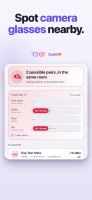
Camera glasses announce themselves over Bluetooth. ZuckOff listens for those announcements and tells you when a lens is in the room.
What it spots
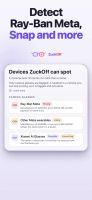
• Ray-Ban Meta and Oakley Meta, by the manufacturer signature in their Bluetooth advertisement
• Snap Spectacles
• Display glasses and headsets, including Quest and Vision Pro, are named in the log but never flagged: a headset is a camera you can see coming
• The full list, and how each one is recognised, is in the app
The evidence, shown
• Every flag lists what matched, whether that was a manufacturer ID, a service UUID or an advertised name
• Confidence is rated possible, likely or strong, and the app says which
• You can disagree with it, because the reasoning is never hidden
Every device, logged
• Sightings keeps a record of all Bluetooth devices heard nearby, glasses or not
• A signal timeline for each device
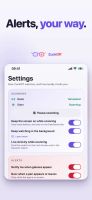
• Own a pair yourself? Mark them once and they stop raising alerts
On Apple Watch
• Check around me scans from your wrist for fifteen seconds and shows the same evidence as the iPhone
• Meeting mode, part of Pro, keeps scanning until you tap Stop and buzzes when a pair turns up
• watchOS only lets the watch listen while ZuckOff is open on its screen. With Always On that includes time with your wrist down, and the Return to Clock setting can stretch it to an hour
• With Pro, a watch face can show the last verdict from your iPhone
On your Mac
• ZuckOff for Mac is on the Mac App Store, for macOS 15 or later. It listens from the menu bar or the Dock
• Pro bought on your iPhone unlocks it on a Mac signed in with the same Apple Account
Shortcuts and Siri
• Start scan, Stop scan, Get scan status and Get suspect count work in the Shortcuts app, in automations and with Siri
• An automation can stop the scan when you get home, even with ZuckOff closed, and start it again when you leave
• Starting a scan with ZuckOff closed needs Pro with background scanning on. Without Pro the action asks to open the app
How close, not which way
• Signal strength gives a rough distance and no direction at all
• ZuckOff shows proximity bands rather than an arrow, because an arrow would be invented
Your data stays on your phone
• No account, no analytics
• The log never leaves unless you export it yourself, or choose to send a hardware report for a device ZuckOff does not recognise, so new glasses can be added later
• A report shows you exactly what it contains before anything is sent
• Your iPhone shares its last verdict with your paired Apple Watch and nothing else
ZuckOff Pro
Scanning is free and always will be. Pro is for the times you are not looking at the screen: background monitoring, alerts, the Live Activity, the Home Screen widget, meeting mode and the watch face on Apple Watch, sighting history beyond 24 hours, and CSV export.







 EU
EU
 POX added ZuckOff as alternative to Nearby Glasses, AirGuard, Tracker Detect and Find My
 Pawel Szydlowski


