Comments about PhotoGIMP as an Alternative to Adobe Photoshop

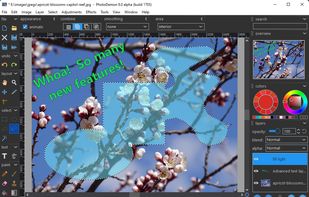
- PhotoGIMP is Free and Open Source
- PhotoGIMP is Privacy focused
Adobe Photoshop serves as a professional raster graphics editor for Windows and macOS, handling advanced image editing, retouching, and digital art. Users praise its extensive feature set for graphics and design, though many complain about high pricing compared to other editors.
GIMP tops the rankings as the leading Photoshop alternative, offering broad image-editing and retouching tools completely free and open-source. Many users switch to GIMP specifically to escape Photoshop's cloud licensing and subscription model. Affinity Photo ranks second with its polished interface and one-time purchase model, repeatedly highlighted as a cost advantage over subscription pricing. Luminar Neo brings AI tools like GenErase and GenExpand plus focus stacking and HDR merging for photographer-centric workflows.
Krita ranks third, focusing on digital painting with advanced brush control and animation support for artists. The alternatives landscape splits between pro photo editors and art-first painting apps, with Photopea standing out as a free, install-free option with PSD support and a familiar interface.
For open source transparency, GIMP and Krita lead with community-driven development and no proprietary licensing restrictions. Linux users have native options in GIMP, Krita, and MyPaint without relying on Windows or macOS-only tools. Windows-only picks include Paint.NET and Corel PaintShop Pro for desktop editing with layers, effects, and selection tools.
Web-based editors like Photopea, Pixlr, and Sumo Paint work in browsers when you can't install software on school or locked-down computers. Users avoiding subscriptions can choose Affinity Photo and Affinity Designer for predictable one-time licensing. For PSD workflows, Photopea, Affinity Photo, and Pixelmator open Photoshop-format documents to maintain collaboration compatibility. iPad workflows benefit from Affinity Photo, Pixelmator, and Pixlr for editing on tablets rather than desktop-only setups.


MediBang Paint is a lightweight software for illustration and making comic books on Windows and Mac OS.


MediBang is used for drawing manga and comic books, NOT editing photos.
It's a wonderful software for painting, not editing photos.

Corel Painter offers realistic traditional media simulation with features like customizable brushes, extensive format support, layering, blending tools, and more, tailored for professional artists working in drawing, painting, and printmaking.


Adobe's mobile photo-editing app lets you edit, share, and upload photos across devices. With features like free 2 GB storage, original size backup, and extra tools for advanced editing, it enhances your images for social media without reducing file quality.


Limited features and none of the real photoshop features
Not even a single useful feature, this is just for adding filters to pictures and making photos the correct size for social media. (from the free version)
miniPaint is free online image editor using HTML5. Edit, adjust your images, add effects online in your browser without installing anything. You can use the Electron based version of the editor if you like.

Comprehensive online editor offering filters, frames, text, stickers, collage creation, graphic design, templates for social media, batch editing, photo retouching, mobile and desktop access, regular updates, and direct sharing to social channels.


It has no layers, but it has a nice tool to change the focal point, and it is much easier than photoshop for basic edits.
Simple for using ,with enough tools

PhotoDemon provides a comprehensive selection of photo editing tools in an 8 MB download. It runs on any Windows machine (XP through Win 10) and does not require installation. It can easily be run from a USB stick or SD card.

Photoline is a professional image editor which offers creatives a mostly non-destructive workflow for 8/16/32bpc image processing and compositing in RGB, CMYK, and Lab modes.
Full vector editing, DTP features, and a HSV/HIS workflow are supported.


While PhotoLine doesn't cover all the aspects of Photoshop, in terms of raw image editing nothing else comes close.

ibis Paint is an easy yet powerful drawing app made with tools for sketching manga right at your fingertips.


Acorn is a photo editor built for the rest of us. With a simple interface and tools for adding everything from text, shapes, and effects, you can make the perfect picture in seconds and minutes, not hours and days.


This is a great little Mac app.

Glimpse is an open source image editor based on the GNU Image Manipulation Program. The goal is to experiment with new ideas and expand the use of free software.

PicMonkey is a feature-rich online photo editor that works right in your browser; no downloads necessary. Touch-up tools like Teeth Whiten, Blemish Fix, Weight Loss. Effects like Orton, Cross Process, Color Boost, with drag and drop ease.


It's a good way for Photoshop users to be able to use GIMP.