





ATLAS Audio Player
1 like
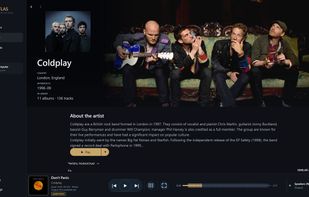
ATLAS Audio Player is a Windows application for organizing, browsing and playing local and network-based music collections. It provides visual navigation through artists, albums and tracks, including artwork and recording information.

Cost / License
- Pay once
- Proprietary
Application type
Platforms
- Windows


Features
ATLAS Audio Player News & Activities
Highlights All activities
Recent activities
- commented on ATLAS Audio Player
A fantastic player! I had been looking for an alternative to Roon for a long time without much success — and finally, I found it!
For practically nothing, I got a player that is just as good as Roon, and in some ways even better.
Many thanks to the developer for creating such a great player!
- reviewed ATLAS Audio Player★★★★★
- lofas7777 A comment was removed from ATLAS Audio Player
- lofas7777 liked ATLAS Audio Player
- lofas7777 added ATLAS Audio Player
- Maoholguin updated ATLAS Audio Player
 lofas7777 added ATLAS Audio Player as alternative to Roon, MusicBee, JRiver Media Center and Audirvana

ATLAS Audio Player information
Developed by
Atlas List StudioLicensing
Proprietary and Commercial product.Pricing
One time purchase (perpetual license) that costs $30.Alternatives
4 alternatives listedBadge
Get an embeddable badge for ATLAS Audio PlayerSupported Languages


Comments and Reviews
A fantastic player! I had been looking for an alternative to Roon for a long time without much success — and finally, I found it!
For practically nothing, I got a player that is just as good as Roon, and in some ways even better.
Many thanks to the developer for creating such a great player!
ATLAS — a real alternative to Roon
Been running ATLAS as my main player for a Hi-Res library hosted on my NAS, and it's exactly what was missing on Windows. No forced subscription, no bloated core server juggling a dozen services you'll never use — ATLAS just does UPnP/DLNA playback right, with proper gapless transitions (no clicks, no dead air between tracks).
SSDP device discovery is rock solid, and rendering control (volume/DSP on the actual renderer) hooks in cleanly — it's clear whoever built this actually understands the protocol instead of wrapping some off-the-shelf library in a UI. The SQLite-backed library opens instantly even on large collections, unlike Roon's endless "indexing."
The UI is dark, editorial-style, easy on the eyes without feeling stripped down — it looks premium rather than like a hobby project.
If you want to just play your Hi-Res collection off a NAS through a UPnP receiver without a monthly fee or cloud overhead, ATLAS beats Roon on simplicity, speed, and honesty as a product.