




Avidemux
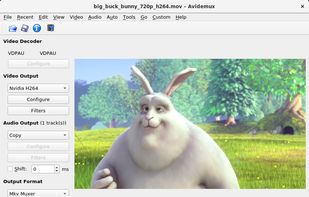
Linear video editor supporting basic cutting, filtering, encoding, batch scripting, and many formats; ideal for single-file edits, trimming, re-encoding, and simple cleanup but not for multi-track or montage projects requiring nonlinear editing capabilities.

Cost / License
- Free
- Open Source
Application type
 EU
EUPlatforms
- Mac
- Windows
- Linux
- BSD
- PortableApps.com


Features
Avidemux News & Activities
Recent News
Recent activities
- TBayAreaPat replied to a comment / review on Avidemux
- TBayAreaPat replied to a comment / review on Avidemux
- TBayAreaPat replied to a comment / review on Avidemux
Avidemux and LosslessCut are 2 great FOSS video editting programs that I use for speed and lightness. They will both clip videos using copy/ remuxing quickly vs having to do slow encoding. Avidemux's 38mb intallation is a lot lighter than Davinci's 3gb+. Avidemux can encode videos toward a specified target file size, in case you want to stay under 500mb, etc. You can also compress with H.264 encoding, and adjusting CRF(Constant Rate Factor) Avidemux has numerous filters available including a...
- TBayAreaPat replied to a comment / review on Avidemux
- Shadow5964 liked Avidemux
 chenjindu added Avidemux as alternative to FreeCompress.video


Featured in Lists

These are all the software I use on my windows machine. I am privacy freak. So, I mostly use open source software....

Useful apps for Windows Additional...

A list with 16 apps by dataculi without a description.
What is Avidemux?
Avidemux Videos
Avidemux information
Developed by
 Mean
Mean Licensing
Open Source and Free product.Written in
Rating
Average rating of 4.2Alternatives
179 alternatives listedBadge
Get an embeddable badge for AvidemuxSupported Languages

AlternativeTo Categories
Video & Movies, Photos & Graphics, Audio & MusicGitHub repository
- 965 Stars
- 148 Forks
- 37 Open Issues
- Updated


Comments and Reviews
Absolute amazing! Just cut out a section out of an mp4 file without re-encoding (no loss of quality!) - excellent stuff!
I don't like Avidemux. There are some little annoyances, like very bad, not reconfigurable shortcuts if you're using an non-english keyboard-layout. The preview is not scalable. You have to input the output name if you're saving cutted parts, again and again. It's not very stable (in Windows only?). It's having big trouble with converting mpeg2-streams, but it don't display any hints it's not able to convert it. So you have to wait hours of encoding too see the audio is asynchron, the resolution wrong or other problems. That's all points VirtualDub is much more comfortable! But Avidemux supports a lot of codecs and containers, while VirtualDub is very limited. I hope AviDemux will gain quality in the future, then it would be a really great tool.
Avidemux and LosslessCut are 2 great FOSS video editting programs that I use for speed and lightness. They will both clip videos using copy/ remuxing quickly vs having to do slow encoding. Avidemux's 38mb intallation is a lot lighter than Davinci's 3gb+. Avidemux can encode videos toward a specified target file size, in case you want to stay under 500mb, etc. You can also compress with H.264 encoding, and adjusting CRF(Constant Rate Factor) Avidemux has numerous filters available including a stabilizing filter. GridPlayer is a very good program to compare results.. before and after side-by-side videos. Avidemux is a great program for a novice, but if you don't need Avidemux's filters or size down features, you might prefer the program LosslessCut for speed viewing, fast rotation copy, and "smart copy" precision-type adjusting/ cropping. Avidemux's cropping to keyframes is fine for my uses.
Note that Lossless can keep original timestamps, Avidemux can't. Also, I take back what I said about LosslessCut's fast rotation copy.. it doesn't seem to work, but I posted another program called Free Video Rotator that works.
I'm not video expert, but I needed to trim a very large video and tried several options. Avidemux was the simplest to use video editor I have used. Other similar programs are very complex. I rated this program with four stars cause I only tried to trim some parts of a large video. What shocked me is that the website looks like the program is discontinued.
FOSS. 38mb is a lot lighter than Davinci's 3gb+. It doesn't do compression per se, but re-encoding using H.264 will do that. You can choose from a range of CRF values.
Software not updated since 2022.
I use this product most days. I find it strikingly easy to use and quick. It does all of the principal tasks that I need to perform on mp4 videos.