BackupKit is a backup app for Windows 10 and 11 that runs scheduled, encrypted backups to storage you already own and control, rather than to a vendor's cloud you rent by the gigabyte.
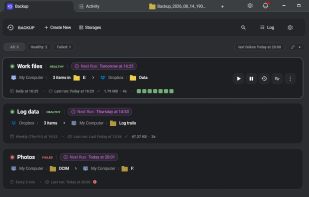
You pick what to protect, pick where the copy goes, and set a schedule — daily, weekly on specific days, a custom interval, or manual. It then runs unattended, with a missed-run policy for when the machine was asleep: skip, run immediately, or wait for the next slot. A health dashboard shows green, amber or red per job, and notifications can go out by email, Telegram, webhook, a local script, or an in-app popup on success, failure or a missed run.
There are 24 destinations: network shares and NAS over SFTP, FTP/FTPS and WebDAV servers, self-hosted Nextcloud, ownCloud and Seafile, consumer clouds including Google Drive, Dropbox, OneDrive, pCloud, Box and MEGA, and object storage including Amazon S3, Azure Blob, Google Cloud Storage, Cloudflare R2, Backblaze B2, Wasabi and DigitalOcean Spaces. Any connected storage can act as a source as well as a destination, so a NAS to a bucket, or a cloud folder back down to a local disk, works the same way as backing up the PC.
Encryption is AES-256 and is applied locally before upload; the password never leaves the machine and cannot be recovered by the developer. Archives are written as standard AES-encrypted zip files, so data can be recovered with any tool that opens an encrypted zip, with or without BackupKit installed. Restore is one click, to the original location, a custom folder, or a new machine, and every run is listed with date, duration, transferred size and status. Retention is by age or version count.
Scope worth knowing before trying it: BackupKit does not do disk imaging, and incremental backups are on the roadmap rather than shipping today, so very large slowly-changing datasets are better served by other tools for now.
Windows 10 and 11. A 30-day trial unlocks every feature and starts on first launch, with no account, email address or payment details required. Paid afterwards, with monthly, yearly and one-time licence options. Made by the developer behind FTPie.






 EU
EU


 Vladyslav Fedoniuk
