
BetterCmdTab icon
BetterCmdTab icon

BetterCmdTab

Native switcher for macOS offers vertical and grid layouts, window and app cycling, menu bar integration, fuzzy search, app launch, unread badges, audio alerts, pinning, quick actions, instant Space switching, full privacy, and robust multi-monitor support.
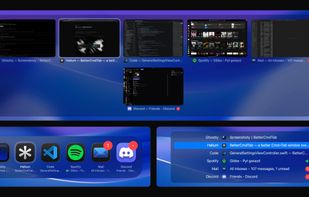
BetterCmdTab screenshot 1

Cost / License

Application type

Platforms

  • Mac
8likes
1comment
0articles

Features

Properties

  1.  Privacy focused
  2.  Lightweight
  3.  Support for Themes
  4.  Customizable

Features

  1.  Ad-free
  2.  Support for Gestures
  3.  Dark Mode
  4.  Works Offline
  5.  Support for Multiple Monitors
  6.  No Tracking
  7.  No registration required
  8.  Application Launchers
  9.  Sits in the MenuBar
  10.  Support for Keyboard Shortcuts

BetterCmdTab News & Activities

Highlights All activities

Recent activities

  • rokartur updated BetterCmdTab
  • andreas_fn2, truefirms and ThreatPort liked BetterCmdTab
  • Guest reviewed BetterCmdTab  

    Unlike the standard Cmd+Tab, which simply switches applications, BetterCmdTab allows you to switch between windows inside a single application. Do you work in Word with three documents and in Chrome with a dozen tabs? One tap of Tab will take you to the next window, rather than jumping between Word and Chrome. This saves a lot of time and clicks.

  • rokartur added Support for Themes as a feature to BetterCmdTab
  • Elessarrrgh, plyght and POX liked BetterCmdTab
  • rokartur updated BetterCmdTab

BetterCmdTab information

  • Developed by

    PL flagArtur Rok
  • Licensing

    Open Source (GPL-3.0) and Free product.
  • Written in

  • Alternatives

    25 alternatives listed
  • Supported Languages

    • English

AlternativeTo Category

OS & Utilities

GitHub repository

  •  72 Stars
  •  2 Forks
  •  0 Open Issues
  •   Updated  
View on GitHub

Popular alternatives

View all

Our users have written 1 comments and reviews about BetterCmdTab, and it has gotten 8 likes

BetterCmdTab was added to AlternativeTo by rokartur on and this page was last updated .

Comments and Reviews

   
Top Positive Comment
Guest
1

Unlike the standard Cmd+Tab, which simply switches applications, BetterCmdTab allows you to switch between windows inside a single application. Do you work in Word with three documents and in Chrome with a dozen tabs? One tap of Tab will take you to the next window, rather than jumping between Word and Chrome. This saves a lot of time and clicks.

Review by a new / low-activity user.

What is BetterCmdTab?

The Command +Tab macOS deserves. Fast, native, liquid glass, zero telemetry, and free forever.

macOS's built-in Command+Tab switches apps, not windows. Third-party alternatives either cost money (Witch, Contexts) or feel heavy and have not adopted Liquid Glass. BetterCmdTab is a single menu-bar agent that boots in milliseconds, draws with the system Liquid Glass material on macOS 26, and ships with no subscription, no license key, and no analytics.

Features:

  • Three layouts — classic list, grid of icons, or live window previews.
  • Letter-prefix jump — type a name to jump to it.
  • Search & launch — press / to fuzzy-find, or launch any installed app.
  • Window switching — Command + ` cycles windows of the front app.
  • Tap or hold — tap to switch instantly, hold to open the switcher.
  • Scroll to switch — spin the mouse wheel to move through apps.
  • Recently closed — reopen an app you just quit.
  • Minimized & hidden — include minimized windows, hidden and windowless apps.
  • Pin & filter — keep favorites up top, hide the rest.
  • Quick actions — quit, close, minimize, hide inline.
  • Unread badges — Dock badge counts, in the switcher.
  • Audio indicator — flags apps playing sound.
  • Instant Spaces — switch Spaces with no animation.
  • Liquid Glass — system material on macOS 26.
  • Accent color — tint the selection to match your system.
  • Multi-monitor — opens on the screen under the cursor.
  • Trackpad & haptics — three-finger swipe, optional feedback.
  • Configurable — custom hotkey, size, scale, layout.

Official Links

