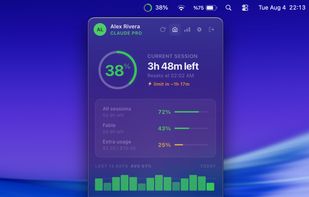
CapMeter sits in the macOS menu bar as a live usage ring and measures how fast you are consuming your Claude session. It turns that rate into a countdown, for example "limit in ~1h 18m", so a long task does not stop halfway through.
It covers usage from both claude.ai in the browser and Claude Code, because Anthropic counts them against the same account-level limits.
Features:
- Burn-rate prediction shown as remaining time, not just a percentage
- Live usage ring in the menu bar, as a percentage or an icon
- Session, weekly and per-model windows, each with its own countdown
- Floating widget that stays above every window, on every Space and over full-screen apps, and never takes keyboard focus
- Extra usage tracking: spend rate in $/hr and remaining credit
- Threshold alerts to macOS notifications, Slack, Discord or any HTTP webhook
- Quiet hours so alerts do not fire at night
- History for 7, 14, 30 and 90 days with CSV and JSON export
- Multiple Claude accounts, switchable without opening a browser
How it reads usage: you sign in to Claude inside the app, on Claude's own sign-in page. The app never sees your password and never touches your browser. It keeps only the session token from that sign-in, in its own isolated cookie container, encrypted with the macOS Keychain. There is no backend, no account is created, no analytics are collected, and conversation content is never read.
Requirements: macOS 12.0 or later, Apple Silicon only. Distributed through the Mac App Store.
Pricing: free for 14 days with every feature unlocked, no card required. After that a single one-time in-app purchase of $14.99. There is no subscription.
Known limitation: usage is read from an endpoint that Anthropic does not document. If Anthropic changes how usage is reported, the numbers stop updating until an update ships through the App Store.
Not affiliated with, endorsed by, or a product of Anthropic.





 Muhammet Sanverdi


