
Casper icon
Casper icon

Casper

Casper™ 6.0 - Complete PC Backup Protection

EXCLUSIVE! Revolutionary SmartClone™ technology enables Casper to maintain a complete backup replacement hard disk for your system in the same amount of time required by other backup and disk imaging solutions to perform a partial or.
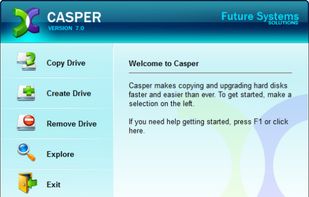
Casper screenshot 1

Cost / License

  • Paid
  • Proprietary

Platforms

  • Windows
2likes
0articles

Features

  1.  Schedule Backup
  2.  Incremental Backup
  3.  Disk Cloning
  4.  Disk Imaging

Casper News & Activities

Highlights All activities

Recent activities

No activities found.

Casper information

  • Developed by

    US flagFuture Systems Solutions, Inc.
  • Licensing

    Proprietary and Commercial product.
  • Alternatives

    4 alternatives listed
  • Badge

    Get an embeddable badge for Casper
  • Supported Languages

    • English

Our users have written 2 comments and reviews about Casper, and it has gotten 2 likes

Casper was added to AlternativeTo by hylozoik on and this page was last updated .

Comments and Reviews

   
Top Positive Comment
BJ
0

Creates a bootable clone, even on an external USB drive! Excellent software. There are a few UI issues (like reporting last backup as "never" when it's really been done successfully). Once they fix these (frankly, stupid) programming issues, I'll give it the fifth star.

Guest
0

Casper 11 does full and incremental cloning of system partititions, producing fully bootable partitions with no need to restore an image. I am not aware of any other Windows program that will do that. XXClone used to do it but was discontinued 7 years ago.

Review from a new or low-activity account — shown here, but not counted in the app rating.

What is Casper?

Casper™ 6.0 - Complete PC Backup Protection

EXCLUSIVE! Revolutionary SmartClone™ technology enables Casper to maintain a complete backup replacement hard disk for your system in the same amount of time required by other backup and disk imaging solutions to perform a partial or incremental backup to a proprietary archive!

SYSTEM REQUIREMENTS

Windows 7™, Windows Vista™, Windows XP, and Windows 2000 Professional1,2 (both 32-bit and 64-bit editions are supported) 100MB available hard disk space 128MB RAM (512MB or more recommended) Backup device (additional internal or external hard disk drive)

1 Not designed for use with Windows NT, Windows Server 2008, Windows Server 2003, Windows 2000 Server, and Windows 2000 Advanced Server.

2 Background copying is not supported on Windows 2000.

WHY?: Its a XXCLONE Alternative for using with Windows 7 and Vista
