
Commander Flow icon
Commander Flow icon

Commander Flow

AI under your cursor in every Windows app: dictate offline in 25 languages free forever, or select any text and command it by voice - translate, rewrite, summarize, draft a reply, format.
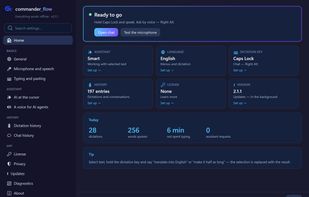
Home dashboard: hotkeys, languages, and how much typing time you saved today

Cost / License

  • Freemium (Pay once or Subscription)
  • Proprietary

Platforms

  • Windows
0likes
0articles

Features

Properties

  1.  Privacy focused
  2.  AI-Powered

Features

  1.  No registration required
  2.  Text to Speech
  3.  Works Offline
  4.  Ad-free
  5.  Dictation
  6.  Speech to text

Commander Flow News & Activities

Highlights All activities

Recent activities

Commander Flow information

  • Developed by

    PTRS Ltd
  • Licensing

    Proprietary and Freemium product.
  • Pricing

    One time purchase that costs $219, and / or subscription ranging between $9 and $13 per month + free version with limited functionality.
  • Alternatives

    23 alternatives listed
  • Badge

    Get an embeddable badge for Commander Flow
  • Supported Languages

    • English
    • Polish
    • German
    • French
    • Spanish
    • Russian
    • Ukrainian
    • Italian
    • Portuguese
    • Czech
    • Dutch
    • Swedish
    • Norwegian Bokmål
    • Danish
    • Finnish

AlternativeTo Category

AI Tools & Services
Commander Flow was added to AlternativeTo by Piotr on and this page was last updated .
No comments or reviews, maybe you want to be first?

What is Commander Flow?

Commander Flow makes the cursor smart: AI lives wherever your cursor is - in every Windows application: Word, a browser, Slack, an IDE, a search box. Nothing to learn - hold a key and speak!

Three payoffs: Time: dictated text and voice edits land right where you work. Money: smart dictation is free forever, and the assistant can be bought once for life! Privacy: your voice and documents are processed on your machine and never leave it.

Hold the hotkey and speak: clean, punctuated text appears right at the cursor, in 25 languages.

The AI text assistant (almost free). Select text in any app and say what to do: "translate to English", "cut it in half", "draft a reply", "format as a business letter", "explain it simply". The edit lands right in your document - no copy-pasting into a chat window. Bonus - an offline chat with a voice.

Everything - speech recognition, the language model, and text-to-speech - runs on your hardware: the app keeps working even with the network cable pulled.