


Copy Path to Clipboard
Like
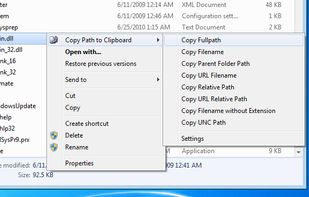
4dots Copy Path to Clipboard is a free small shell extension that extends the right click menu of Windows Explorer and allows you to copy the path of the selected files or folders (one or multiple) to the clipboard.

Cost / License
- Free
- Proprietary
 EU
EUPlatforms
- Windows


Features
Copy Path to Clipboard News & Activities
Highlights All activities
Recent activities
 ZuraGuerra added Copy Path to Clipboard as alternative to Pathly

Copy Path to Clipboard information
Developed by
 Alexander Triantafyllou
 Licensing
Proprietary and Free product.Alternatives
6 alternatives listedBadge
Get an embeddable badge for Copy Path to ClipboardSupported Languages


Comments and Reviews
Shift+right click on a file will call up a "Copy as path" option in the context menu.
It does what you want. Hmm, learn something new every day, huh?
Not needed... true, if you know about the Shift + Right Click. If not, then additional functionality added to the context menu just might be useful for some users.
Reported Unwanted Software Page!
This web page at www.4dots-software.com has been reported to contain unwanted software and has been blocked based on your security preferences.
Unwanted software pages try to install software that can be deceptive and affect your system in unexpected ways.