


FileMenu Tools
87 likes
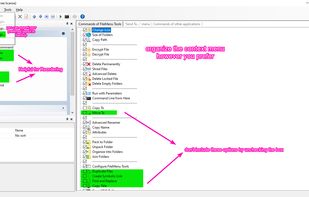
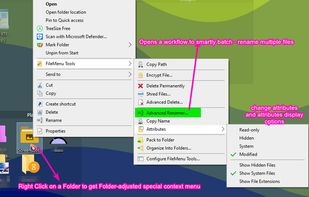
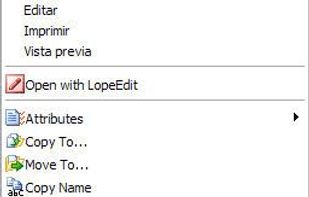
Modify the Windows Explorer right-click menu, add built-in utilities, run custom commands, create symbolic links, sync folders with bidirectional deletion, reveal subfolder sizes, manage 'Send to' options, and enable or disable context entries from other apps.

Cost / License
- Freemium (Pay once)
- Proprietary
Application typeApplication types
 EU
EUPlatforms
- Windows
- File Explorer


+22


Features

FileMenu Tools News & Activities
Highlights All activities
Recent News
No news, maybe you know any news worth sharing?
Share a News TipRecent activities
 POX added FileMenu Tools as alternative to FileUtils
 Ga-per-efarin added FileMenu Tools as alternative to Right Click Windows Magic
 Maoholguin added FileMenu Tools as alternative to Symbiote
- devcik liked FileMenu Tools
 namir7887-star added FileMenu Tools as alternative to Kontext
- dkaralexis liked FileMenu Tools
- kamoltuk2001 liked FileMenu Tools
- Fla updated FileMenu Tools
 bufferer added FileMenu Tools as alternative to ContextMenuManager
- FanX liked FileMenu Tools


Featured in Lists

A list with 328 apps by christineconnor without a description.
List by christineconnor with 328 apps, updated

A list with 35 apps by asphaltkisser without a description.
List by asphaltkisser with 35 apps, updated

List of all the windows apps
List by rahulsaigal with 99 apps, updated
What is FileMenu Tools?
FileMenu Tools Videos
FileMenu Tools information
Developed by
 LopeSoft
 Licensing
Proprietary and Freemium product.Pricing
One time purchase (perpetual license) that costs $10 + free version with limited functionality.Rating
Average rating of 3.4Alternatives
47 alternatives listedBadge
Get an embeddable badge for FileMenu ToolsSupported Languages


Comments and Reviews
I tried to install Windows10 Pro 64bit. It can be installed without adware. Uncheck the adware in a custom installation.
Since 7.1 FMT isn't provided with adware, but free version doesn't allow adding custom commands and built-in are limited to 20 files/dirs. Without custom commands it have many alternatives. When it comes to custom commands it was the only one, AFAIK (if I'm wrong I beg you, please tell me an alternative!). And I'd even buy it, but not from the author who added adware to his application. Well, it was his right (for me morally bad), but "no, thanks" is my right :P
I have received updates in sometime. Does anyone know if this developer is still active? I love this program and use it daily, but am weary of relying on it as part of my SOP if it is no longer active.
I love this little shell extension program. it completes the the default context menu with additional options, some of which should have been included with Windows. It's fully customizable, meaning you can choose only those commands that you want, you can order them and group them however you want, and you can export and then reuse your choices on another machine. The built in tools for batch renaming files and organizing multiple files into folders are great if you work with folders that have many files
So many useful options! I love being able to easily copy contents of a file without opening it.
I am stuck on version 6.8 since that was the last version of the installer that has not been flagged as containing a virus.
While I understand there are ways to get around the OpenCandy virus, I'm unwilling to bother, just to install an upgrade.
I hope that LopeSoft will someday offer a virus-free version of their installer again.
OpenCandy is not (was not) a virus. It is/was adware ... pest ware Unsolicited program
Since the installer changed to use OpenCandy on 6.7.2, it should be fine when add " /NOCANDY" option to by-pass it, according to OpenCandy.
But the installer is still concerned contenting any adware, it any experts to check with it?