


Shell
59 likes
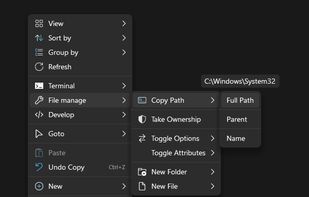
Shell is a context menu extender that lets you handpick the items to integrate into Windows File Explorer context menu, create custom commands to access all your favorite web pages, files, and folders, and launch any application directly from the context menu.

Cost / License
- Free
- Open Source (MIT)
Application type
Platforms
- Windows


Features

Shell News & Activities
Highlights All activities
Recent News
No news, maybe you know any news worth sharing?
Share a News TipRecent activities


Featured in Lists

This is the apps for Windows 11 that I would recommend to anyone who just got a PC ! The same list...
List by Darlene Sonalder with 142 apps, updated

This is a list that prefers open-source and lightweight Windows applications. A few partially open-source or...
List by Sam Lander with 66 apps, updated
A list with 97 apps by namdx1987 without a description.
List by Nam Pham with 97 apps, updated
What is Shell?
Shell Videos
Shell information
Developed by
 Nilesoft
 Licensing
Open Source (MIT) and Free product.Written in
Rating
Average rating of 4.5Alternatives
21 alternatives listedBadge
Get an embeddable badge for ShellSupported Languages

AlternativeTo Category
OS & UtilitiesGitHub repository
- 6,845 Stars
- 265 Forks
- 246 Open Issues
- Updated


Comments and Reviews
Once you get familiar with how the nss files work and how to configure them, it's a very powerful tool and you can change the context menu of your Windows 10/11 system how you like. Good documentation on the website as well.
Best context menu option
Bit technical to set up, highly customizable, stable and makes context menu extremely useful
Examples: Move selected files to new sub folder, copy file path, convert images or audio files right from the context menu and so on
The developer of Nilesoft Shell is Nilesoft, an independent software development company based in Nasr City, Cairo, Egypt. The company was founded in 2019 by Mahmoud Gomaa and specializes in creating lightweight, ad-free, and resource-efficient applications very good shell please fix country of origin as it shows china !! needs to be changed to Egypt
Nilesoft Shell is a game-changer for anyone who frequently works with the Windows File Explorer. This lightweight, yet powerful application offers a seamless way to extend and customize the right-click context menu, allowing users to perform tasks more efficiently and with fewer clicks. Whether you're a developer, a sysadmin, or just someone who wants more control over their workflow, Nilesoft Shell offers unparalleled flexibility.
One of the standout features is its intuitive interface, which makes it easy to add, remove, or modify context menu items without diving into the Windows Registry. You can create custom commands, scripts, or even batch operations directly from the menu, saving time and enhancing productivity. The application's support for a wide range of file types and commands means you can tailor your context menu to perfectly suit your needs.
Moreover, the ability to apply conditions to menu items ensures that your context menu remains uncluttered, only showing relevant options based on the file type, location, or other criteria. This level of customization is rarely seen in similar tools and makes Nilesoft Shell a standout choice.
In summary, Nilesoft Shell is a must-have for anyone looking to enhance their Windows experience. It combines power, flexibility, and ease of use in a way that few other applications can match, making it a top recommendation for power users and professionals alike.
Shell is great, free, open-source, and very customizable.
It's not intuitive or easy to use for the average user though. You have to learn quite a bit. There are many other click and play applications that do similar things.
I gained functions and lost functions in context depending on location clicked. For instance, seem to lose "Send To" functionality on desktop. Didn't do anything that I liked enough to keep, and required a reset of thinking as to where things were. Doesn't work in context menu while in a 3rd party explorer. What I suggest is that before you install, take some screenshots (win + "prnt screen" button, paste in Win Paint) and click a few items like desktop items, a file in explorer, etc, to be sure that you like the context options better after you install this program.