Our users have written 2 comments and reviews about CSVpad, and it has gotten 1 likes
CSVpad was added to AlternativeTo by e2_e8 on and this page was last updated .
Comments and Reviews
Tear-a-Byte
★★★★★
•
0
No text-to-column feature. If the file lacks a header, the separator can't be changed. Columns can't be renamed. Drag-and-drop doesn't work on the executable—only within the app window. In these aspects, it's less capable than Notepad. However, it's sufficient for visualizing data and making small edits.
Review from a new or low-activity account — shown here, but not counted in the app rating.
I tried to do a copy/paste from a Google Drive Spread sheet to CSV Pad and it didn't happen in cell form.
Then I realized, I didn't really need to. Google made things easy enough.
Official Links
What is CSVpad?
CSVpad is a handy free CSV (Comma-separated values) editor.
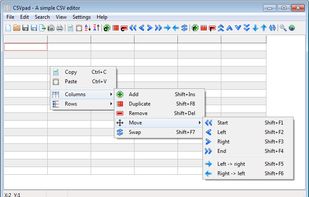
It support's unicode and it is a portable application.
CSVpad can manipolate columns and rows. Export CSV files into html / xml / OpenDocument Spreadsheet (ods) and Microsoft Excel 8.0 (xls) files.
Before downloading CSVpad take a look at the online documentation.
CSVpad is based on the DMcsvEditor
CSVpad works under Windows 8, Windows 7, Windows Vista, Windows XP & Linux.
Comments and Reviews
No text-to-column feature. If the file lacks a header, the separator can't be changed. Columns can't be renamed. Drag-and-drop doesn't work on the executable—only within the app window. In these aspects, it's less capable than Notepad. However, it's sufficient for visualizing data and making small edits.
I tried to do a copy/paste from a Google Drive Spread sheet to CSV Pad and it didn't happen in cell form. Then I realized, I didn't really need to. Google made things easy enough.

