rawNote is a feature-rich all-in-one notebook & notepad that integrates note-taking, mind mapping, to-do list, handwriting, sketching, drawing and painting. Whether you're a student, teacher, artist, designer, engineer, or someone else, DrawNote offers powerful tools designed to spark your imagination and creativity.
? Infinite Canvas - Create Infinite Possibilities
• DrawNote has an infinite canvas, allowing your imagination and creativity to be fully utilized.
• Using the flexible canvas, you can place text, pictures, recordings, tables, mind maps and other content arbitrarily.
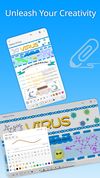
• You can sketch, draw and paint on the notepad and whiteboard with your finger or stylus. Writing, drawing diagrams and annotating content as freely as on paper.
• Abundant stickers make your notes more lively and interesting.
? Various note types
• There are a variety of note types for notes, including Super Note, Text Note and Mind Mapping, to meet different usage scenarios.
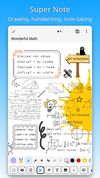
• Super Note combines handwriting, drawing, text, picture, table, mind map and other elements to fully express your creativity and artistic talent.
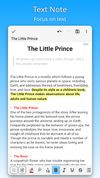
• Text Note focus on text. Support rich text settings, such as color, thickness, size and margin, etc.
• Mind Mapping help you quickly record ideas and organize knowledge. You can freely choose styles, borders, colors and styles.
? Easily manage notes and share
• Organize your work, study and personal life by managing your notes with unlimited folders.
• You can sort notes by date, name, etc., and manually sort them.
• Supports exporting notes in the notebook as high-quality pictures for easy sharing with others.
• Use DrawNote as a notebook, journal or notepad. Access, organize and share your notes anytime, anywhere.
? Efficiently manage to-do list
• Create to-dos in DrawNote to make sure you never miss something important.
• Set the priority and end time for the to-do items, and pin the to-do items to the system notification bar.
• Use the notepad to manage your daily plans and tasks.
? Data security and privacy protection
• Cloud backup via Google Drive, turn on the auto backup option to ensure that your data will not be lost.
• Set passwords for specific notes and folders to fully protect your privacy.
? Other Features
• DrawNote can be used as a digital whiteboard and notepad. The markup function helps you find important points and attract attention, which is very suitable for teaching and presentations.
• Support dark mode and switch different theme colors according to personal preference and mood.
• The user interface is simple and elegantly designed for ease of use. Of course, no ads.
DrawNote is a super notebook & notepad. It is the first choice for you to record study notes, make teaching materials, conceive creative ideas, manage task lists, write literary works, record personal moods, and even pursue artistic creation.