DualFlow KVM is a native software KVM built specifically for two Windows 11 x64 PCs. Control both computers with one physical keyboard and mouse over your local network, without a hardware KVM, cloud relay, or video streaming.
Move your pointer across a configured screen edge to switch seamlessly between Host and Client. Each computer keeps its own monitors, GPU, and running applications.
KEY FEATURES
• Seamless keyboard and mouse sharing
Control two Windows 11 PCs using one keyboard and mouse. Move naturally between their displays without manually switching devices.
• Native file and folder drag-and-drop
Drag files and folders between Host and Client in either direction. Transfers use copy semantics, so the originals remain on the source computer.
• Clipboard sharing
Copy and paste text, files, and folders between the two computers.
• Windows sign-in and lock-screen control
Control the paired Client at the Windows sign-in and lock screens after initial installation and pairing.
• Remote Ctrl+Alt+Del
Send Ctrl+Alt+Del to Client using Ctrl+Alt+End from Host or the dedicated in-app action.
• UAC and elevated-window support
A dedicated Windows input service enables supported interactions with administrator prompts and elevated applications.
• Flexible multi-monitor layouts
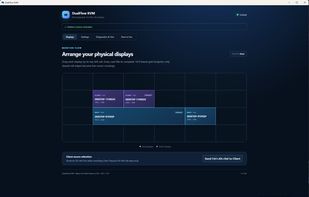
Arrange displays on a 6×4 canvas, including complex multi-monitor configurations. DualFlow also responds to supported monitor connection, disconnection, resolution, and scaling changes.
• Secure local pairing
Connect Host and Client over your trusted local network without routing keyboard and mouse input through a cloud service.
• Coordinated updates
Update compatible Host and Client installations from Host. Client is updated and verified before Host proceeds with its own update.
BUILT FOR TWO-PC WORKFLOWS
DualFlow KVM is built with Rust and Tauri for Windows 11 x64. It is designed for users who work, create, develop, or game across two separate PCs and want them to feel like one continuous desktop.
Includes a 10-day trial and a one-time lifetime license.
Official website: https://getdualflow.com/
GitHub: https://github.com/sorensenlasse1980-code/dualflow-kvm








 DeskStitch added DualFlow KVM as alternative to DeskStitch
 sorensenlasse1980-code added DualFlow KVM as alternative to Synergy, Mouse without Borders, Input Director and Input Leap

 DualFlow Software / Lasse Sørensen
