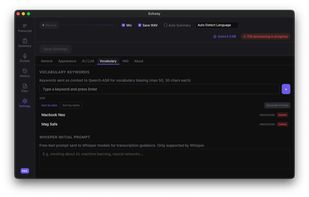
Echosy is an macOS desktop app that captures system audio and microphone, transcribes speech in real-time using on-device ASR models (Qwen3-ASR, MLX Whisper, Whisper), and provides system-wide dictation — all running 100% locally. No cloud uploads, no subscriptions, no data collection. Your recordings, transcripts, and models live entirely on your machine.
Live Transcription
System audio + microphone captured via ScreenCaptureKit
VAD-based chunking with adaptive noise floor — no fixed-interval cuts
Real-time segments with timestamps streamed as they are recognized
Audio level waveform visualization during recording
Auto-save transcripts as Markdown, optional WAV recording
Export as .md or .txt, copy to clipboard
ASR Model Management
10 models across three backends:
Qwen3-ASR (GPU via MPS): 0.6B (~1 GB) and 1.7B (~2 GB)
MLX Whisper (GPU via Metal, Apple Silicon only): Small, Large V3 Turbo, Large V3
Whisper (CPU fallback): Tiny, Base, Small, Medium, Large V3
One-click download with real-time progress tracking (bytes downloaded / total)
Switch models on the fly — old model is unloaded from GPU memory before loading the new one
Delete unused models to reclaim disk space
Universal Dictation
Cmd+Shift+D to start/stop from any app
Speech is transcribed locally and pasted at your cursor
Works with CJK text (Chinese, Japanese, Korean)
Live waveform and segment history in the Dictation tab
Streaming Summary
Send transcript to OpenAI, Gemini, or any OpenAI-compatible endpoint
Token-by-token streaming with rendered Markdown preview
Customizable system prompt (meeting notes, lecture notes, etc.)
Auto-saved alongside the transcript
Session History
Browse all past recordings with duration, size, and date
Search, sort, inline rename, and delete
Preview transcripts and summaries without leaving the list
Load any past session back into the app for review or re-summarization
File Transcription
Drag & drop WAV, MP3, MP4, MOV, or M4A files
Chunked transcription with real-time progress
Fully offline — same local ASR models used for live recording
Multi-Language UI
English, ????, ????, ???, ???
Auto-detects from system locale, switchable in Settings
Appearance
Dark, Light, and System theme (follows macOS)
Adjustable font size (Small / Medium / Large)
System Integration
System tray with recording/dictation controls and active indicator
Global hotkeys: Cmd+Shift+R (recording), Cmd+Shift+D (dictation)
Permission checks with one-click links to System Settings
Configurable workspace folder for all recordings and transcripts




 SandersJason added Echosy as alternative to Whisper Vox
 POX added Echosy as alternative to Qwen Scribe
 usevoicywithRB added Echosy as alternative to Voicy - Speech to Text
 Danilo_Venom added Echosy as alternative to Super Voice Mode
 VoicePadAI added Echosy as alternative to VoicePad AI


