Video Encoder GUI
A cross-platform Python GUI application for encoding video files using HandBrake or FFmpeg. Features automatic track detection, preset management, and real-time progress tracking.
Features
Cross-platform: Works on Windows and macOS
Dual encoder support: Use HandBrake or FFmpeg
HandBrake preset support: Load and use HandBrake JSON presets
Preset management: Dropdown selection with auto-save and last-used preset auto-loading
Automatic FFmpeg translation: Converts HandBrake presets to FFmpeg commands
FFmpeg command management: Save, load, delete, and manage custom FFmpeg commands
Placeholder system: Use {INPUT}, {OUTPUT}, {AUDIO_TRACK}, {SUBTITLE_TRACK}, {SUBTITLE_FILE} in FFmpeg commands
Smart track detection: Automatically finds English audio and subtitle tracks with configurable patterns
Track detection configuration: Customize language tags, name patterns, and exclude patterns for audio and subtitles
Real-time progress: See encoding progress with ETA, speed, and duration parsing
Built-in log viewer: Monitor encoding output in real-time
Folder structure preservation: Maintains directory structure in output
Encoding modes: Sequential or parallel encoding
Skip existing files: Option to skip files that already have encoded versions
Dry run mode: Test encoding without actually processing files
Auto-install dependencies: Automatically installs FFmpeg, HandBrake, and mkvtoolnix via package managers
Auto-detect executables: Automatically find FFmpeg, HandBrake, and mkvinfo paths
Settings auto-save: Settings are automatically saved when changed
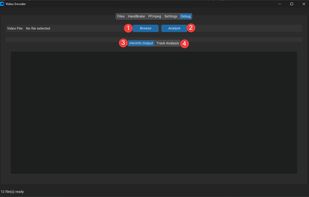
Debug tab: Analyze individual files to see track information and mkvinfo output
Cross-platform config: Platform-appropriate config directory handling (Windows: AppData\Local, macOS/Linux: ~/.video_encoder)
Requirements
Python 3.8 or higher
FFmpeg (auto-installed via Chocolatey/Homebrew)
HandBrake CLI (auto-installed via Chocolatey/Homebrew)
MKVToolNix (auto-installed via Chocolatey/Homebrew)







 Maoholguin added ffmpeg_encode as alternative to GetCompress
 66HEX added ffmpeg_encode as alternative to Frame - Offline Media Converter
 POX added ffmpeg_encode as alternative to ExSqueezeMe
 ryahn added ffmpeg_encode as alternative to FFmpeg, Shutter Encoder, Avidemux and VidCoder


