


Figma
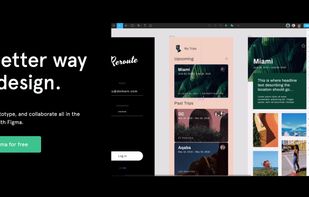
Figma is a web-based platform offering a robust set of tools for vector graphics editing and prototyping, along with offline desktop apps for seamless workflows. Designed specifically for UI and UX design, it emphasizes real-time collaboration, visual versioning, and vector networks to streamline the designer's work.

Cost / License
- Freemium (Subscription)
- Proprietary
Application typeApplication types
Platforms
- Mac
- Windows
- Online
- Android
- iPhone
- Chrome OS
- Android Tablet
- iPad
- Software as a Service (SaaS)


Features

Figma News & Activities
Recent News
- Fla published news article about Figma
 Figma introduces Nested Folders for improved file organization and team collaboration
Figma Projects now offer nested folders, enabling teams to organize files across multiple levels fo...
- Fla published news article about LottieFiles
 LottieFiles plugin enables direct Lottie exports from Figma
LottieFiles has released a plugin for Figma Motion that allows users to discover, animate, and expo...
- Maoholguin published news article about Figma
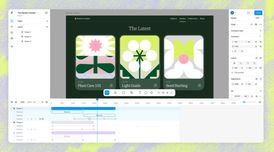 Figma launches a new integrated Motion design tool alongside Code Layers & new AI features
Figma has announced several new tools and AI features at its annual Config 2026, with Figma Motion ...


Recent activities



Featured in Lists

There is no doubt that Adobe Suite is great, even in some case it's probably the best. But you can be mad...
For quite a long time, I've been looking into entirely ditching [Adobe Creative...

Spoiler: I've switched to Linux for my main computer, and [here's what I'm currently...


What is Figma?


Figma information
Developed by
 Figma
Figma Licensing
Proprietary and Freemium product.Pricing
Subscription ranging between $12 and $15 per month + free version with limited functionality.Rating
Average rating of 4.4Alternatives
135 alternatives listedNews
60 news article related to FigmaBadge
Get an embeddable badge for FigmaSupported Languages
AlternativeTo Categories
Photos & Graphics, Backup & Sync, Office & Productivity, Business & Commerce, Remote Work & Education, DevelopmentApple AppStore
- Updated
- 4.62 avg rating


Comments and Reviews
Extremely intuitive app, great to do high fidelity prototypes without the features overkill of an Adobe app.
De-facto industry standard, but the pricing is classic monopoly abuse. It deliberately pushes you to the $190/seat plan by removing essential functions and/or making available things harder.
Update: Figma's billing practices is borderline scam. I was literally charged 3 times for 1 month of 1 Professional seat. The support is silent OF COURSE.
Figma solved the problem that made design-to-dev painful: the gap between what the designer made and what the developer received. The inspect panel gives exact values, and browser-based access means no file-version confusion.
For solo developers doing their own UI work, the free tier is enough. Components, auto-layout, and frames handle 90% of what a side project or portfolio needs.
The collaborative features (multiple cursors, comments on designs) are genuinely useful even for two-person teams. Real-time updates, no file exports needed.
Top of the top) I like it, using every day for work tasks
I like it! The best app for design
Figma is pretty good for UI and UX. with a large community it's easy to find templates and inspiration.
Figma = fire. Learned it in no time
you should try the Penpot