
Fixyfier icon
Fixyfier icon

Fixyfier

Fixyfier is a free Windows optimization and repair tool that combines powerful built-in utilities into one clean, intuitive interface.
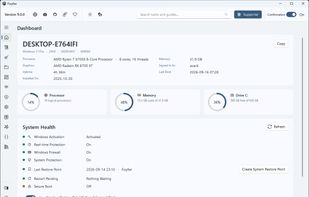
Fixyfier Light Mode Interface

Cost / License

  • Free
  • Proprietary

Application type

Platforms

  • Windows  Windows 10 version 17763.0 or higher
1like
0articles

Features

Properties

  1.  Privacy focused
  2.  Lightweight

Features

  1.  No registration required
  2.  No Tracking
  3.  Dark Mode
  4.  Delete Temporary Files
  5.  Works Offline
  6.  Ad-free
  7.  Duplicate File Finder
  8.  Software Uninstallers
  9.  System Tweaker

Fixyfier News & Activities

Highlights All activities

Recent activities

Fixyfier information

  • Developed by

    GR flagiZi Media Group
  • Licensing

    Proprietary and Free product.
  • Alternatives

    24 alternatives listed
  • Badge

    Get an embeddable badge for Fixyfier
  • Supported Languages

    • English
    • Arabic
    • Albanian
    • Bengali
    • Bulgarian
    • Chinese
    • Croatian
    • Czech
    • Danish
    • Dutch
    • Finnish
    • French
    • German
    • Greek
    • Hebrew
    • Hindi
    • Hungarian
    • Indonesian
    • Italian
    • Japanese
    • Korean
    • Norwegian
    • Persian
    • Polish
    • Portuguese
    • Romanian
    • Russian
    • Serbian
    • Spanish
    • Swahili
    • Swedish
    • Thai
    • Turkish
    • Ukrainian
    • Vietnamese
    • Tagalog
Fixyfier was added to AlternativeTo by avardak on and this page was last updated .
No comments or reviews, maybe you want to be first?

Official Links

What is Fixyfier?

Fixyfier is a free Windows maintenance and repair toolkit that gathers the utilities Windows already ships with — DISM, SFC, CHKDSK, the built-in troubleshooters, the network commands, the service and package managers and dozens of buried settings — into one clear interface, so they can be used without memorising commands or digging through Settings. More than 140 tasks sit across twelve screens, and a single Fix task runs the temporary-file clear-out, a DNS flush, Disk Cleanup, DISM, SFC and a disk check in one pass, with a tick box for each of the seven steps. Its dashboard reports what the machine is, how hard it is working and whether anything is actually wrong. Elsewhere Fixyfier uninstalls Store apps and desktop programs in bulk, puts a switch on each preinstalled app, turns 54 advertising and diagnostic-data settings off one by one or all at once, explains every Windows service and what depends on it, and saves any sequence of tasks as a routine you can run again with one click. It is a convenience layer, not a magic fix: every advanced task shows the exact command before it runs and asks Windows for a restore point first. No ads, no account, no telemetry, no analytics, and 39 languages — with one optional one-time unlock for running your own scripts.

