
Fleet Terminal icon
Fleet Terminal icon

Fleet Terminal

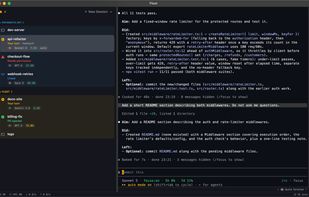
Fleet Terminal is a native macOS terminal built for running several AI coding agents side by side. Every session gets a row in the sidebar with a live status colour — working, your turn, needs permission, question, MCP call in flight — plus a short plain-English line about what...
Fleet Terminal screenshot 1

Cost / License

  • Free
  • Proprietary

Platforms

  • Mac  Requires macOS 14 or later. Apple silicon and Intel.
0likes
0articles
Save

Features

Properties

  1.  Support for Themes

Features

  1.  Command line interface
  2.  Ad-free
  3.  No registration required
  4.  Dark Mode

Fleet Terminal News & Activities

Highlights All activities

Recent activities

Fleet Terminal information

AlternativeTo Categories

OS & Utilities, AI Tools & Services, Development

Popular alternatives

View all
Fleet Terminal was added to AlternativeTo by fleet-terminal on and this page was last updated .

No comments or reviews, maybe you want to be first?

What is Fleet Terminal?

Fleet Terminal is a native macOS terminal built for running several AI coding agents side by side. Every session gets a row in the sidebar with a live status colour — working, your turn, needs permission, question, MCP call in flight — plus a short plain-English line about what that session is doing, the model it is using and how much of its context is left, all read from the agents' own transcripts. One keyboard shortcut jumps to the next session waiting on you, and a menu-bar extra and Dock badge count what needs attention while the app is in the background.

It works with Claude Code, Codex and Antigravity in any mix, and is an ordinary terminal for everything else: your own shell and dotfiles spawned untouched, a scratch-shell drawer, search across every session's scrollback at once, groups and launch profiles for multi-worktree work, session restore, themes, and a bundled Nerd Font so a powerline prompt renders on first launch.

Free, notarized by Apple, with no account and no API key. Requires macOS 14 or later, Apple silicon or Intel.