


Fluent Search
48 likes
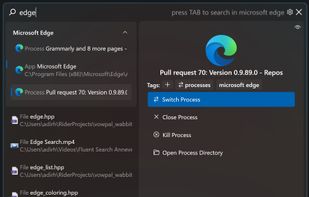
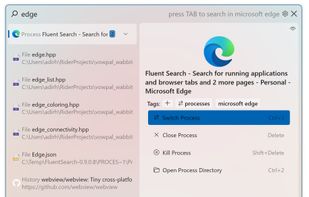
Fluent Search is a fast and easy-to-use search application that lets you search for running applications, browser tabs, bookmarks, files, and more. Unlike Windows Start Menu, Fluent Search focuses on continuing existing work, it let you jump easily between running application...

Cost / License
- Free
- Proprietary
Application typeApplication types
Platforms
- Windows


+11



Features
Fluent Search News & Activities
Highlights All activities
Recent News
No news, maybe you know any news worth sharing?
Share a News TipRecent activities
 stavrosbuilds added Fluent Search as alternative to Swyvo
 ProtagonistLabs added Fluent Search as alternative to Lume Launcher
- ngswyzhy59 liked Fluent Search
 pcfan added Fluent Search as alternative to Flash Launch
- H-Tung added Fluent Search as alternative to Lertaro
 POX added Fluent Search as alternative to Hister
 akshaynikhare added Fluent Search as alternative to RealtimeClipboard
 Danilo_Venom added Fluent Search as alternative to BeaconFind, Pronto Search, FilesDesk and PixaFind
 POX added Fluent Search as alternative to Tinycast
 ezWhy added Fluent Search as alternative to WSearch


Featured in Lists

this list is on inverse order
List by kaekazeh with 50 apps, updated

Priorities - Functionality - Minimal RAM power - customizable - accesible - plugins - good UI design - skins and...
List by kaekazeh with 24 apps, updated

A list with 20 apps by Randir without a description.
List by Randir with 20 apps, updated

What is Fluent Search?
Fluent Search information
Developed by
Fluent SearchLicensing
Proprietary and Free product.Rating
Average rating of 4.8Alternatives
144 alternatives listedBadge
Get an embeddable badge for Fluent SearchSupported Languages


Comments and Reviews
It has Everything Search built-in!!! Also sports a Screen Search where you can enter letters for various elements on the screen. Reduces need for mouse! Definitely a promising start for this app!
you can use Fluent as Start Menu replacer
download AutoHotKey and create this script, then launch the script in Autorun when Windows start (its set to [CTRL] + [SPACE] so... you need to change the script if not use this combo in Fluent, with this script when you press [Win] key open Fluent instead Start Menu):
#Requires AutoHotkey v2.0 RWin:: { Send "^ {Space}" return } LWin:: { Send "^ {Space}" return }
Surprised to see the Vim-like key mapping option..I think that's great. To use that, press CTRL M.. then hold Shift and type the letters. ESC removes the tags. I appreciate this program for that feature, and in time I will learn other features.
Spectacular file search and launcher. Lots of features and shortcuts.
Have tried a lot of launcher in search of a Spotlight alternative, like Listary, ueli, Keypirinha, Powertoys run etc. This one is easily the best of the ones I have tried! It has a LOT of customizability, good search algorithm (with machine learning I believe), indexing of network shares, and is also very fast. Great work from the developers, who also seem very active
This is the most awesomest launcher of all launchers! Integrates with Everything and QuickLook! This tool is almost too good to be true.
Only app I found to replace listary