Fountain+ Studio is free screenwriting software — a screenplay checker, reports, pre-coverage and script converter for Google Docs™ and web app.
Write in standard screenplay or in the Fountain format and watch live script coverage and proofreading reports update as you type.
It's focused on the high-value parts of a script analyzer — a free alternative to paid screenplay software, supporting Fountain, Mangaplay and traditional screenplay formats. Works alongside Final Draft, Highland, Slugline and the Fountain Obsidian plugin. No installs, no servers, no AI.
The built-in PDF importer works with PDFs, FDX, Fountain and other industry formats to get your story into Google Docs seamlessly.
You can keep your existing screenwriting software like the Fountain Obsidian plugin or other Chrome Extensions.
The goal is to give writers more writing options, run structural checks, then export cleanly to their preferred screenplay editor or writing assistant.
Core Features
1: Instant Pre-Coverage checks without a Final Draft licence
Drop in a script and get a fast script breakdown in seconds — pacing graphs, structural curves and balance scores.
2: Draft Reports in the browser
Scene, Character, Location, Cast, Dialogue, Scene Heading, Statistics, Story. Industry-standard reports, exportable with no .fdx lock-in — works on .fountain and .mangaplay.md
3: Screenplay Converter + Export pipeline
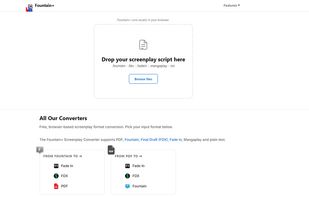
Convert between Fountain, FDX, FadeIn, PDF and Mangaplay in one click. PDF to Fountain, Fountain to FDX, FDX to PDF — a free screenplay converter with no upload, no AI or generated content.
4: Lives inside Google Docs
Sits in the Google Docs side panel next to your screenplay — coverage and reports update as you type, no copy-paste, no second editor to switch to.
5: 100% AI-Free, 100% Yours
No magic servers, no copyright grey areas. Every report and export is your work to sell or hand to a producer, agent or writers' room.
6: No Accounts, No Excuses
No signup, no email, no "I'll start tomorrow." It's completely free. Open Fountain+ Studio and start pre-checking your work before sending it out.
How To Get Started:
- Open a Google Doc
- Click the Fountain+ Studio button (bottom-right corner)
- Start typing your script - panels appear in the side panel
- View your coverage
Fountain+ Studio was created by Pistol Taeja as part of a suite of tools for any creator to start the process of producing their story.








 gasperjw1 added Fountain+ as alternative to The Scriptwriter
 pistoltaeja added Fountain+ as alternative to WriterDuet, Story Architect (STARC), Celtx and Fade In


