




Lively Wallpaper
98 likes
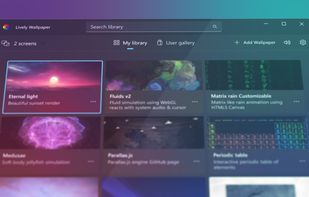
Transforms your desktop by letting you use GIFs, videos, interactive web pages, or developer-made content as animated wallpapers or screensavers, with support for ultrawide or multiple monitors, scripting, resource-efficient playback, music integration, and APIs.

Cost / License
- Free
- Open Source (GPL-3.0)
Application type
Platforms
- Windows


Features
Lively Wallpaper News & Activities
Highlights All activities
Recent News
No news, maybe you know any news worth sharing?
Share a News TipRecent activities
- mrcyodev liked Lively Wallpaper
- soul1472 liked Lively Wallpaper
- VyomStark liked Lively Wallpaper
 walyro added Lively Wallpaper as alternative to Walyro
 POX added Lively Wallpaper as alternative to WallTune
- Derekman liked Lively Wallpaper
 foreverainn added Lively Wallpaper as alternative to Tayu
- Maoholguin updated Lively Wallpaper
 fluxlay added Lively Wallpaper as alternative to Fluxlay
- mIKEtHEn00B liked Lively Wallpaper


Featured in Lists

This is the apps for Windows 11 that I would recommend to anyone who just got a PC ! The same list...
List by Darlene Sonalder with 142 apps, updated

A list with 807 apps by AmileyaRyver without a description.
List by AmileyaRyver with 807 apps, updated
Clean, small, use! For activation use: [https://massgrave.dev/](https://massgrave.dev/) or...
List by littlebighorse with 53 apps, updated

What is Lively Wallpaper?
Lively Wallpaper Videos
Lively Wallpaper information
Developed by
 Dani John
 Licensing
Open Source (GPL-3.0) and Free product.Written in
Rating
Average rating of 5Alternatives
45 alternatives listedBadge
Get an embeddable badge for Lively WallpaperSupported Languages

AlternativeTo Category
Photos & GraphicsGitHub repository
- 19,634 Stars
- 1,355 Forks
- 390 Open Issues
- Updated



Comments and Reviews
Lightweight animated desktop program. Load up whatever GIF, WEBM, etc. you want & let it go to work. Just be cognisant of using large files.
My computer is win10 64bit,but it's mistakes has been reported.App doanloaded always X86,can you tell me how to resolve the problem
Any installed live wallpapers just say file not found. No help anywhere, uninstalled.
It is simple to use and does exactly what I want it to do! It allows me to put up animated wallpapers on my desktop!
When I got an new windows machine for christmas, I searched around if there is anything that can change the look and feel of my system, I couldn’t find an open sourced, free and user friendly solution to it easily. I scourged all over internet looking for such a solution, I couldn’t find one that I liked. When I finally gave up on the hunt, a person by the name rockdanister posted his first release of lively in reddit. I was a bit skeptical about his work. Neverthless I gave it a try and as expected it was bad.
Over the coming months this one guy/girl kept on rolling out new updates with cool features, new looks and most importantly showed a commitment to sqaush bugs reported on github.
The support over on his discord channel is also superb, where 100s of people are always ready to help you out, whenever anyone gets stuck.
Eventhough later I found out many more applications which can do similar things, I still like lively and its strong one person dev team.
You are doing god’s work mate. Hope this application gets acquired by Windows and gets directly integrated into it.
9/10 - 1 point deducted because you are not putting a price tag on it.
EASILY better than screen play, how do I know:
Image PC, install one, set a "WebGL fluid simulation" FROM HERE then "dance the mouse wildly" monitoring cpu/ram use..., then restore, install the other and do EXACT SAME TEST
One uses about 40% the resources of the other.
THE WINNER IS BY FAR "Lively Wallpaper"
[Edited by aazard, October 14]
[Edited by aazard, October 14]
so easy and usefull and beutiful